
320-x100(1).gif)
JNTUH OD Apply Online 2025, Application Form: How to Apply for OD in JNTU Hyderabad? Here we have listed the Complete process of JNTUH Convocation Apply For Original Degree Under JNTUH. So candidates check out the complete details of procedure of Apply for OD in 2025, Jntuh od application last date, JNTUH OD application 2025, JNTUH OD application fee in 12th Convocation.
JNTUH OD Apply Online 2025 – Original Degree Application Form, Registration
JNTU Hyderabad has released XIII Convocation Notification 2025. The candidates who are qualified for the award of Degree/Diploma during the academic year 2023-24, PG and Ph.D Degree completed or going to be completed on or before 24-02-2025 are eligible to apply.
JNTUH Convocation apply for OD (Original Degree)
The procedure for applying for the original degree certificate has been changed. You are required to register with online payments portal of the examination branch of JNTU Hyderabad. After the registration, you will be directed to make the payment either by payment gateway (using your credi/debit cards). For the registrations and for making the OD registration fee payments, please visit the following web-site: epayments.jntuh.ac.in.
Here we have listed step-by-step process to apply jntuh original Degree (OD) online. Follow the below guide regarding “OD Application process of JNTUH”
JNTU Hyderabad 13th Convocation 2025 – Important Dates:
| JNTUH Convocation 2025 Date | January 2025 |
| Online Application Starts From | 21-01-2025 |
| Last date to Apply | 25-02-2025 |
| JNTUH OD application fee | Rs.1000/- |
Helpful for Students Seeking:
- How to Apply For OD in JNTUH
- Apply for OD in 2025
- JNTUH B.Tech OD Application Process in detail
- Process to Apply for OD in JNTU Hyderabad
JNTUH Convocation Apply Online – Procedure to apply for Original Degree Certificate
Welcome to the online student services. The registration procedure for obtaining the original degree certificates from JNTU Hyderabad in XII Convocation is through online mode only. The candidates have to furnish their particulars including Provisional Certificate (PC) number and the address for communication in online mode.
The application fee of Rs. 1000/- (One Thousand Rupees only) can be paid either by making online Payment (using Credit/Debit card or Internet Banking). Those Students who have applied for degree in Pre-Convocation mode should not apply for this Convocation. The Students Who have already paid Rs. 600/- for the Original Degree (OD) fee in their College need to pay Additional fee of Rs. 400/-, however the registration is compulsory in this Convocation for obtaining the OD.
For carrying out the registrations using this application software, the candidates are informed to create their account by furnishing their personal details. Further the candidates are informed to remember their passwords for any future correspondence or updates. The User name shall be the hall-ticket number of the candidate during the study of the course for which he/she is seeking the Original Degree certificate. The Original Degree Certificate (other than PhDs) shall be sent to the candidates to the correspondence address mentioned at the time of online registration. The last date for applying for OD in this Convocation is 25/02/2025.
JNTUH How To Apply an OD Original Degree:
The candidates who are qualified for the award of Degree/Diploma during the academic year 2023-24 & PG Degree completed or going to be completed on or before 24-02-2025 are eligible to apply.
JNTUH OD application fee: Rs.1000/-
JNTUH OD application 2025: The registration procedure for obtaining the original degree certificates for all Convocation OD’s is through online only.
Apply Online For Original Degree (OD)
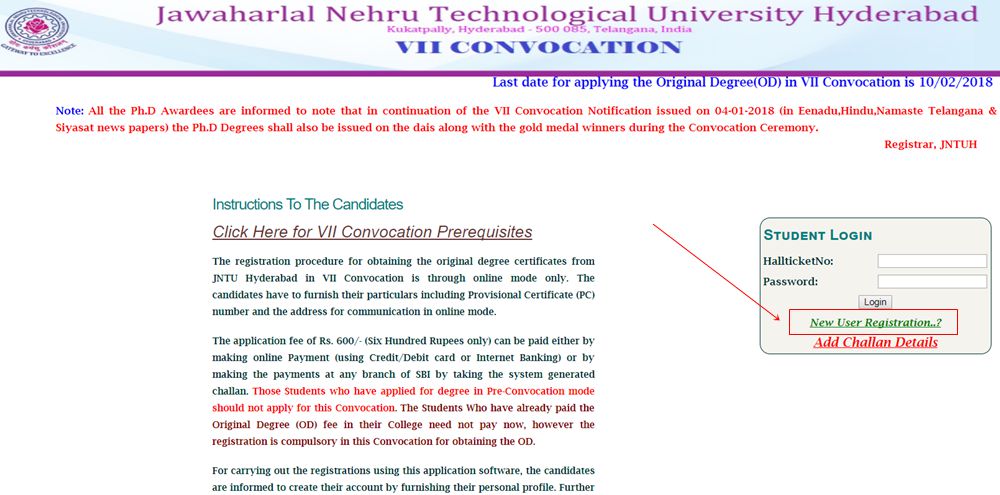
1. The new users of this service has to enroll initially using the service New User Registration.
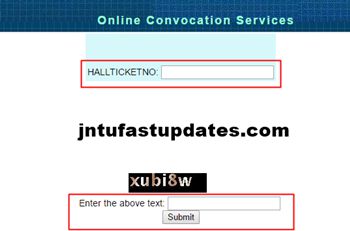
2. Enter your “HALLTICKETNO” and click one “SUBMIT” Button
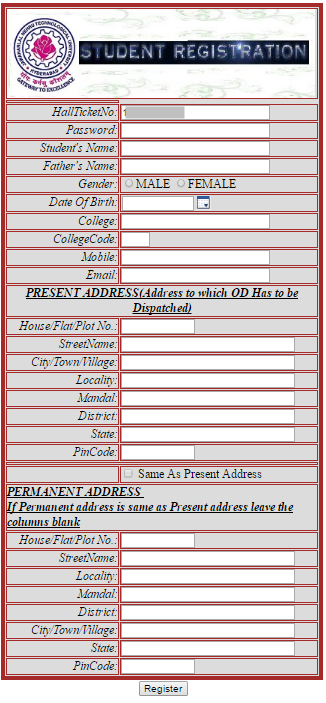
3. Fill all details in Students Registration carefully, especially address details*
- Hallticke No
- Password
- StudentName
- FatherName
- Gender
- Date Of Birth:
- College
- College Code
- Mobile
4. The Password has to be created by the student at the time of registration. Further the candidates are informed to remember their passwords for any future correspondence or updates. The User name shall be the hall-ticket number of the candidate during the study of the course for which he/she is seeking the Original Degree certificate.
5. The fee amount can be paid either by making online Payment (using Master/Visa Credit/ATM cards).
6. Go to epayments.jntuh.ac.in/convocation
7. Login with your HT number (userid) and password (as set by you) and Upload the scanned copy of Provisional Certificate.
8. Click and select convocation OD then you will get acknowledgement file in .pdf format. Download and save it for future use.
Please contact helpdesk phone numbers: 9491283135, 9491293135 for enquiries/queries.
(or)
Email to: support.convocation@jntuh.ac.in
FREQUENTLY ASKED QUESTIONS (FAQ’s)
Only Those candidates can apply for Convocation whose PC issued date is on or before 25-02-2025. Scanned Copy of a Digital Passport size Photograph (.JPEG format) should be between 20kb to 30kb. Scanned Copy of Provisional Certificate (.JPEG format), size should be between 200kb to 300kb. Provisional Certificate NUMBER (Number that is above the serial no of PC, Mostly Starts with 3).
“Users should not pay fee multiple times for one request. Because every transaction will take
You should contact JNTUH Exam Branch at Email: support.convocation@jntuh.ac.in or at helpline no. 8008103825, 9491293135 during 10:30 AM to 5:00 PM on all working days.
Click on forgot password link available at the home page of online student service portal. It will ask to enter your hall ticket number, registered mobile number & email-id for verification. Once the verification is successful, you will receive your password to your registered email-id.
II) Procedure To Apply For Original Degree Certificate (PC received before October 2002) :: Post-Convocation
1. Filled in Original Degree Application Form. [Download Original Degree Application Form Here]
2. D.D. in favour of “THE REGISTRAR, JNTUH” payable at HYDERABAD.. (H.T. No. & Mobile No. may be written on the back side of DD)
Note : Enquire about DD Amount at students service counters at JNTUH.
3. PC Xerox Copy.
4. Another pass-port size photograph with HTNO written on the back of Photograph
5. Submit the above documents at students service counter, JNTUH, Kukatpally, Hyderabad.
6. Retain a photocopy of this application with you.
7. If you have not received the certificate with in 60 days of your application,contact the Director of Evaluation for EMS (Speed Post) number. No claim of non-receipt of Certificate shall be entertained if it is not reported with 60 days of your application.
This is the procedure to apply for original Degree Certificate (OD) (Pre/Post Convocation). If you are still having any query in this regard, leave a comment below and we will get back to you.
sir i register correctly but my date of birth is automatically changed to 1/1/70 but my original dob 14-10-1993 sir please give me edit option
Please sir reply me urgent I have no time
This might be silly a question, but why do you actually need an OD. I mean, things are actually happening well with PC and CMM, right? Jobs, Mtechs, Masters, then why do you we even need an OD now? Please let me know. Thank you.
after the announcement of convcation date pc will be no longer valid
sir i entered my date of birth wrong suggest me how to correct. how to edit my date of birth please let me know.
Sir unfortunately I pressed inconvocation option
What is the solution.edit option is not working
regarding uploding documents , it did’nt asked me to uplod the id proof and photo, asked to uplod PROVISIONAL CERTIFICATE only . but i got acknowledgement form .did my regestration is correct or wrong please say me
sir, instead of pc,cmm is uploaded,now it is not opening.how should i cahange.i did not enter sign,photo etc.
u can upload pc if u have not done the payment
Sir
Net shop fellow did a mistake instead of uploading my pc he have uploaded my cmm but i gt a acknowledgment pdf would it be any problem or i would get the od. If it creates a problem what is the solution what should i do help out sir
i got acknowledgment but i did not paid the money
I had the same problem if you got any solution please tell me at p.krishnadeva@gmail.com
HOW TO ADD BANK CHALLAN DETAILS IN JNTU WEBSITE
HOW TO ADD BANK CHALLAN DETAILS IN WEBSITE BECAUSE I PAID WITH CHALLAN
same problem with me how to add the challan details in the website
please let me know wat is the next procedure
hi…………i dont enter photo ,sing & any numbers but its give acknologement pdf to me that means i applyed r not
if acknowledgemnt is generated then u have applied for it
Sir I entered my date of birth correctly but it changed to 1/1/70 please sir give me an edit option sir it is automatically registered please sir help me to change my date of birth please sir……..
sir, I want to change my date of birth it is automatically changed to another date..how do I change my date of birth..is there any edit option…plz help..
WANT TO CHANGE A DATE OF BIRTH AND GENDER IN REGISTRATION DETAILS ITS NOT CHANGING WHAT TO DO ……………………………………………………..
Sir I want to edit my clg name how I can do plzzzzzzz help me
mail me i will say the procedure for editing the details. Details can be edited only if u have not done the payment
Hi sir,
I entered wrong dob, so please can you help me for edit option.
I will be appreciate you for you response.
Thanks
I entered my correct date of birth. But it changed to another date while applying for of convocation. Is there is any chance to edit the date of birth .Pls help me.
sir i register correctly but my date of birth is automatically changed to 1/1/70 but my original dob 16-06-1994
Read more at: http://www.jntufastupdates.com/jntuh-od-apply-online/
I entered my correct date of birth. But it changed to another date while applying for of convocation. Is there is any chance to edit the date of birth .Pls help me
sir i register correctly but my date of birth is automatically changed to 1/1/70 but my original dob 19-03-1992
sir please give me edit option
I did the same mistake. i entered my date of birth wrong if u get the solution please let me know.
hi…………i dont enter photo ,sing & any numbers but its give acknologement pdf to me
that means i applyed r not
sir,i have applied for VIth convocation but while paying fee i did not get otp to my no.and again if i want to pay the fees its not showing me online payment instead of that it is showing pdf format and it is not opening
applyed successfully
bt pc scan 200-300kb