TS DEECET 2019 Application From (Started) – Apply Online For Telangana DIETCET Exam Dates Notification

Telangana DEECET Notification 2019 Apply Online: The government of School Education Department Telangana announced the Diploma in Elementary Education Common Entrance Test (DEECET) information bulletin 2019 on its official portal, tsdeecet.cgg.gov.in. Aspirants seeking to apply for TS DEECET 2019 can download the information bulletin from 10th March 2019. And the DEECET online applications forms can be filled from 11th March to 4th April 2019. Interested and eligible aspirants can apply for D.El.Ed (Diploma in Elementary Education) and D.P.S.E (Diploma in Pre-School Education) through DEECET 2019. Before applying for the DEECET 2019 aspirants can check all the details from the information bulletin. Here we have updated all the relevant information about Telangana DEECET 2019 Application form, exam dates, and syllabus details in this article.

TS DEECET-2019 Online Applications Submission will be extended up to 15-04-2019

TS DEECET Notification 2019 Application From – Apply Online Registration For Telangana DIETCET, Exam Dates, Eligibility
Telangana DEECET 2019

The government of School Education Department Telangana annually conducts the Diploma in Elementary Education Common Entrance Test (DEECET) entrance test for admission into 2-year Diploma in Elementary Education course. This examination is annually being organized by the TS School Education Department is to offer admission in 2 years Diploma in elementary education and Diploma in Pre-School Education in Private and Government District Institutes of Educational Training in Andhra Pradesh. Yearly, many of the hopefuls compete for this examination to get admission in D.El.Ed and D.P.S.E courses. Candidates clearing the DEECET with good merit will get admission in 2 years Diploma in Education (D.Ed) course in government District Institution of Educational Training (DIET’s) and Private Elementary Teacher Training Institutions in Telangana for the academic year 2019-2021.

TS DEECET 2019 – Information

Name of the Conducting Authority The government of School Education Department Telangana
Official Websitedeecet.cdse.telangana.gov.in
Name of the Examination  Diploma in Elementary Education Common Entrance Test (DEECET)
Admission IntoD.El.Ed (Diploma in Elementary Education) and D.P.S.E (Diploma in Pre-School Education) courses
Academic Session 2019 – 21
Date of Examination 22nd May 2019
Application Starting date  11th March 2019
Last Date to Apply15th April 2019

TS DEECET 2019 Eligibility Criteria

Educational Qualification

Candidates seeking admission in all government DIETs and Private un-aided elementary teacher education institutes must have the educational qualification of

  • Intermediate or equivalent educational qualification as decided by the TS DEECET committee. The candidate must have qualified in the corresponding qualification by the time of admission.
  • Applicants must have passed the relevant qualifying examination with 50% or above marks to apply for DEECET 2019. While SC/ST/PH Candidates require 45% to apply for the DEECET.
  • Note: students with 10+2/intermediate vocational courses are not eligible to apply for DEECET.

Age Limit

Candidates should have completed 17 years of age as on 1st September of the year of admission. There is no recommended upper age limit t get admission in D.El.Ed/D.P.S.E courses.

TS DEECET Exam Pattern, Syllabus 2019

Telangana DEECET will be conducted in 3 languages based on the choice of applicants. The examination will be conducted for 100 marks and will contain the multiple choice questions; the duration of the test will be 2 hr 30 min. There will be 3 parts of the examination.

TS DEECET 2019 Exam Pattern English language
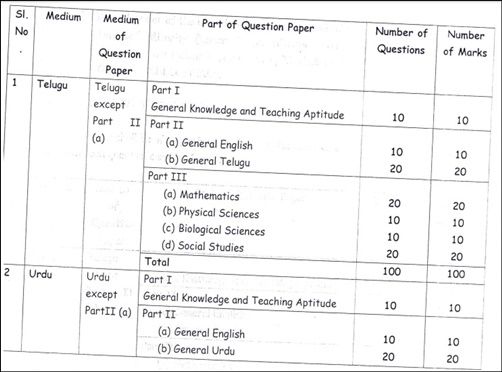
TS DEECET 2019 exam pattern for Telugu and Urdu languages
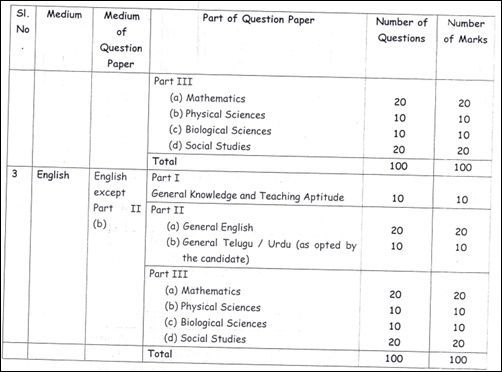
Note: Part III will be conducted class 10th level questions. For detailed information about TS DEECET Syllabus candidates can go through the TS DEECET Notification 2019.

TS DEECET 2019 Exam important dates

EventDate [Scheduled]
Notification release date 8th March 2019
Payment of application fee through online 10th March 2019
Submission of application forms through online 11th March to 4th April 2019
Last Date for payment of application fee 15th April 2019
Last Date for submission of application forms 15th April 2019
Telangana DEECET Exam date 22nd May 2019

TS DEECET Cutoff Marks/Qualifying Marks

Candidates competing for TS DIET CET exam must get the qualifying marks in the examination to get shortlisted for the admissions in D.El.Ed or D.P.S.E courses.

For OC/BC Candidates the qualifying marks will be 35% in overall marks and for SC/ST Candidates there will be no qualifying marks. The allotment of seats will be done as per the information specified in TS DEECET Information bulletin. Candidates can check the clear details from it.

Application Fee

Candidates wishing to apply for TS DEECET 2019 will have to pay a fee of Rs 413/- through payment gateway service provided on deecet.cdse.telangana.gov.in from 10th March to 4th April 2019.

TS DEECET Application Form 2019

Candidates having the suitable eligibility criteria can apply through online at tsdeecet.cgg.gov.in. TS DEECET Application form 2019 will be available from 11th March to 4th March 2019. Interested aspirants can fill up the application form during these days by paying the requisite application fee.

Download TS DEECET Notification 2019Available Now

TS DEECET 2019 Application Form RegistrationApply Here 

How to apply for TS DEECET 2019 Application form

  • Initially, applicants need to visit the DEECET Official website, deecet.cdse.telangana.gov.in.
  • Go through the TS DEECET 2019 information bulletin 2019 clearly.
  • Register with the site using the email id and other required details and generate the unique enrollment number.
  • Sign in with the generated enrollment number and log id.
  • Fill up DEECET Application form with required information.
  • Pay the requisite application fee through the provided payment gateway.
  • Finally, click on the apply button. And take a printout of the application acknowledgment for further reference.
RDD Kerala VRP, BRP Admit Card/Hall Ticket 2019 Download @ rdd.kerala.gov.in

RDD Kerala VRP, BRP Admit Card 2019: Rural Development Department, Kerala is going to organize the Block Resource Personnel and Village Resource Personnel written test in the month of May. All the hopefuls applied for BRP and VRP posts in Kerala must get ready to attend the examination as per the scheduled dates. Aspirants applied for RDD jobs have to download RDD Kerala VRP BRP Admit Card 2019 to attend the examination. Hall ticket/admit card is the most important document required to attend the examination. The exam invigilators will verify the admit card of the candidate before allowing him/her to proceed with the test. Candidates who fail to show the admit cards at the time of verification will not be allowed to take part in the examination. Hence all the hopefuls applied for RDD Kerala VRP posts must download and keep the hall ticket safe to carry to the examination. Applicants can download the hall tickets from RDD Kerala websites, socialaudit.kerala.gov.in or rdd.kerala.gov.in. By tapping on the corresponding link the hall tickets can be downloaded.

RDD Kerala VRP, BRP Admit Card/Hall Ticket 2019 Download @ rdd.kerala.gov.in

RDD Kerala VRP Admit Card 2019

Rural Development Department (RDD), Kerala is the state government wing working for rural development related works. This organization notifies various jobs based on the requirement. Recently, RDD Kerala announced 2921 Block Resource Personnel and Village Resource Personnel jobs. Many of the candidates having a suitable profile to apply for VRP and BRP posts have applied during the application dates. The organization received lakhs of applications from interested and eligible aspirants. The selection of suitable candidates will be done through the written test and interview rounds. Finally, aspirants who clear the selection rounds with good merit will be shortlisted for the RDD Kerala jobs.

RDD Kerala VRP, BRP Admit Card 2019 – Important Details

Organization NameRural Development Department, Kerala
Post NameBlock Resource Personnel and Village Resource Personnel
Job categoryKerala State Government Jobs
Total Number of Posts2921
CategoryAdmit Card
Hall Ticket Release DateMay 2019
Exam DateMay 2019
Official Sitesocialaudit.kerala.gov.in or rdd.kerala.gov.in

Download RDD Kerala VRP BRP Hall Ticket 2019 @ rdd.kerala.gov.in

The RDD Kerala will be conducting the VRP written test in May 2019. The examination is going to be conducted across Kerala state. Aspirants can check the exam date, timings, and other details from their respective admit cards. Hall ticket/admit card is the most required document to carry to the examination. Aspirants have to download RDD Kerala VRP BRP Admit card 2019 from the official website, rdd.kerala.gov.in. The hall ticket will be accessible before 10 days of the examination [Tentatively].

Hall ticket will contain the details of

  • Candidate’s name and date of birth
  • Hall ticket number
  • Candidate’s photograph and signature
  • Father’s name
  • Date and timings of the examination
  • And other guidelines

Candidates can check all the details once after downloading the admit cards. For any corrections, in any of the columns, candidates can approach the RDD Kerala authorities through email or phone. The officers will check the request and re-issue the admit cards to the candidates. Candidates have to attend the examination at their allotted examination centers. Report before 30 minutes of the examination to avoid the risk. Candidates must have to carry the hall tickets without fail. And also it is important to carry any of the valid identity proof copy along with the hall ticket.

The Id proof might be a,

  • Aadhar card
  • Vote Card
  • PAN Card
  • Passport
  • Driving license
  • Or any other valid ID proof.

Click This Link to download RDD Kerala VRP BRP Hall ticket 2019 –  Available Soon

Steps to download RDD Kerala VRP, BRP Admit Card 2019

  1. Visit RDD Kerala official portal, rdd.kerala.gov.in
  2. Search for ‘Kerala RDD VRP BRP Hall ticket 2019 download’ link on the homepage.
  3. Click on it and specify the required details.
  4. Tap on the submit button.
  5. The hall ticket gets downloaded.
  6. Check all the details once and take a printout, keep it safe to carry to the examination.

TNPSC Group 4 Syllabus 2022 in English & Tamil Download PDF @ tnpsc.gov.in

0

TNPSC Group 4 Syllabus 2022 PDF: TNPSC has released recruitment Notification 2022 for 7301 Vacancies. Candidates can check Scheme of Examination and Syllabus for TNPSC Group 4 Examination in the Commission’s Website at www.tnpsc.gov.in.

TNPSC Group 4 Syllabus 2022 in English & Tamil Download PDF @ tnpsc.gov.in

tnpsc

Combined Civil Services Examination-IV (Group-IV). Applications are invited from eligible candidates only through online mode upto 28.04.2022 for Direct Recruitment against the vacancies in the following posts included in the Tamil Nadu Ministerial Service, Tamil Nadu Judicial Ministerial Service, Tamil Nadu Secretariat Service, Tamil Nadu Legislative Assembly Secretariat Service, Tamil Nadu Slum Clearance Board Non-Technical Subordinate Service and Tamil Nadu Housing Board Subordinate Service.

Tamil Nadu Public Service Commission is the Tamil Nadu state’s functional authority that recruits manpower for various associated organizations of it. Annually the organization releases notifications for various posts. TNPSC releases various notifications for Group I, Group II, Group III, and Group IV posts every year. Candidates seeking to get state government jobs in Tamil Nadu can apply for TNPSC jobs as per the application dates. TNPSC shortlists the candidates on the basis of their performance in the preliminary examination, mains examination, and interview rounds. Candidates qualifying all the rounds with good merit will be appointed in Tamil Nadu state government jobs.

TNPSC Group IV Syllabus 2022 – Important Details:

Name of the Organization Tamil Nadu Public Service Commission (TNPSC)
Official Website tnpsc.gov.in
Category Group IV Syllabus English & Tamil
Number of Posts 7301
Application Starting Date 30.03.2022
Last Date to Apply 28.04.2022
Exam Date 24.07.2022 (9.30 A.M.to 12.30 PM)

SCHEME OF EXAMINATION (OBJECTIVE TYPE) (OMR METHOD):

SubjectDurationMaximum MarksMinimum Qualifying Marks for selection (All Communities)
Single Paper (S.S.L.C Std.)
Part-A
Part-B
Total=200 Questions /300 Marks
3 Hours30090

TNPSC GROUP – IV Examination (S.S.L.C. Standard)

Combined Civil Services Examination-IV

PART-A

&

Part-B

General Studies

(SSLC Standard)

(Topics for Objective Type)

  • GENERAL SCIENCE
  • CURRENT EVENTS
  • GEOGRAPHY
  • HISTRORY AND CULTURE OF INDAI
  • INDIAN POLITY
  • INDIAN ECONOMY
  • INDIAN NATIONAL MOVMENT
  • HISTORY, CULTURE, HERITAGE AND SOCIO-POLITICAL MOVEMENTS OF TAMIL NADU
  • DEVELOPMENT ADMINISTRATION IN TAMIL NADU
  • APTITUDE & MENTAL ABILITY TESTS

Download TNPSC GROUP 4 SYLLABUS 2022 PDF

UPPCL Technician Admit Card 2019 – Uttar Pradesh Technician Hall Ticket @ uppcl.org

UPPCL Technician Admit Card 2019: Uttar Pradesh Power Corporation Limited (UPPCL) is going to conduct the screening test for technician (line) posts shortly. All the hopefuls applied for UPPCL Technician jobs can get ready to attend the examination. As the organization announced 4102 vacancies, the competition is also proportionally high for the technician posts. Hence candidates have to show their good merit in the examination to get shortlisted for the next rounds of selection process. To attend the examination candidates have to download the hall tickets. The hall ticket/admit card is the essential document needed to carry to the examination. Candidates will not be allowed to attend the examination if they do not show the admit cards at the time of verification. Hence all the hopefuls need to carry the admit cards mandatorily while going to the examination. The hall ticket link will be soon activated on UPPCL website, uppcl.org. By just tapping on the link aspirants can download UPPCL Technician hall ticket 2019.

UPPCL Technician Admit Card 2019 – Uttar Pradesh Technician Hall Ticket @ uppcl.org

UPPCL Technician Admit Card 2019

Uttar Pradesh Power Corporation Limited (UPPCL) is the state government organization works for power supply related operations. The organization releases various recruitment notifications every year to hire suitable candidates into various posts. UPPCL recently announced 4102 technicians (line) vacancies. Many of the aspirants from across the Uttar Pradesh state having suitable eligibility have applied for UPPCL Technician line jobs in the month of March. The organization will shortlist the candidates based on their performance in written test and interview rounds. Candidates will be shortlisted on the basis on merit. Hence candidates who qualify the selection tests with good merit will be employed for the technician posts in UPPCL with a good pay scale.

UPPCL Technician (Line) Hall Ticket 2019 – Important Details

Name of the organizationUttar Pradesh Power Corporation Limited
Official website uppcl.org
DesignationTechnician (Line)
No of vacancies4102
LocationUttar Pradesh
CategoryAdmit Card
Date of Exam 2nd Weak of May 2019
Admit Card Release DateUpdate Soon

Download UPPCL Technician Hall Ticket/Admit Card 2019

Hopefuls competing for the Uttar Pradesh Technician written test can get their hall tickets by visiting the official website, uppcl.org. The hall ticket/admit card link will be activated before 10 days of the examination (tentatively). Hence the competitors can stay checking the UPPCL website continuously to check the updates regarding the hall ticket. Soon, the organization will let the competitors know about admit card availability information. Hopefuls can check the details of the candidate’s information and exam center info from their admit cards. The admit card will carry the information of,

  • Candidate’s name
  • Register/hall ticket number
  • Signature
  • Photograph
  • Date of Birth
  • Father/Mother’s Name
  • Examination date
  • Timings of the test
  • Venue of the examination
  • And others.

Candidates can check all the details after downloading the hall ticket. If any printing mistakes appear in the mane, date of birth or any other field, the aspirants can contact the UPPCL helpline numbers for necessary rectification of details. Candidates must carry the admit cards without fail while going to the examination. Otherwise, they will miss the opportunity to write the examination. Along with the admit cards, carry any of the Xerox copies of the following identity proof.

  • Aadhar card
  • Driving Licence
  • PAN Card
  • Passport
  • Ration Card
  • Or any others.

Direct Link to Download UPPCL Technician Admit Card 2019 – Available Soon

Steps to download UPPCL Technician Admit Card 2019

  • visit the UPPCL website, uppcl.org
  • Search the UPPCL Technician Hall Ticket download link in organization website.
  • Click the download link and enter the required details like Name and registration no.
  • Submit the details and it will display on the screen after some time.
  • Check the information in Uttar Pradesh Technician Hall Ticket 2019.
  • Save or download the admit card and take a printout.

WBSSC Admit Card 2019 – Clerk, Group C & D Hall Ticket, Exam Date Download @ westbengalssc.com

West Bengal Central School Commission /West Bengal School Service Commission (WBSSC) is ahead to conduct the Group C and Group D examination. This year the competition is higher for the Group C and Group D posts. All the hopefuls who are going to attend the written test can get the WBSSC Group C, Group D Hall ticket from the official portal, westbengalssc.com. The WBCSC is going to organize the WBSSC Group D/Group C written test in August/September months. Hence applicants have to download WBSSC Group C, Group D hall ticket to attend the examination. Hall ticket verification will be done at the examination centers. Do not forget to carry the admit cards while going to the examination. Make sure to carry any of the valid identity proof such as Voter Id/Aadhar Card or any others while going to the examination. Check more details such as examination date, and other important guidelines from the following.

WBSSC Admit Card 2018 – Clerk, Group C & D Hall Ticket, Exam Date Download @ westbengalssc.com

West Bengal Central School Commission is the state level organization that issues various notifications annually. Recently, the notification for 591 Group C and Group D posts such as Clerk, assistant, and others. Many of the hopefuls have applied for the WBCSC posts during the application dates. The organization received a large number of applications from the interested and eligible aspirants. The organization is going to conduct the written test and interview rounds for the aspirants. The organization is going to conduct the written test in the months of September month.

WBSSC Group C & Group D Admit Card 2018-19 – Important Details

Organisation NameWest Bengal Central School Commission (WBCSC)/West Bengal School Service Commission (WBSSC)
Recruitment BoardUniversity of Calcutta
vacancies In Number591 Posts
Post NameClerk, Group C & Group D Posts
Admit Card Released DateExpected in April 2019
Exam DateApril 2019 (Expected)
CategoryWest Bengal Group C and Group D Admit Card 2019
Job LocationWest Bengal
Official website westbengalssc.com

Download Group C and Group D Hall Ticket 2018

Applicants who had applied for the Clerk, Group C, and Group D posts can get the admit card from the WBSSC official portal, westbengalssc.com. The organization will release the admit card before 10 days of the examination (approximately). Candidates can download it and check the details of examination such as examination center, date, timings etc. also check the details of name, register number, date of birth, etc from it. Carry the admit card/hall ticket along with any of the valid identity proof.

Steps to download WBSSC Group C & D Admit Card 2018-2019

  • Visit the official site com
  • On the homepage “West Bengal Group C and Group D Admit Card 2018” Link appears on the screen.
  • Enter Registration Number and Date of Birth
  • Click on Submit Button
  • The hall ticket gets downloaded.
  • Take a print out of it to carry it to the examination.

Important Links

Download WB Group C and Group D Hall Ticket 2019(Available Soon)

JNTUH Equivalence Subjects in which the Supply Students of R09 Regulations need to study after six attempts

JNTUH Equivalence Subjects in which the Supply Students of R09 Regulations need to study after six attempts

jntuh

Sub: A letter to Principals for equivalence subjects in which the supplementary students of R09 regulations need to study after six attempts? Reg

In the communication to the Principals, vide ref-1 cited above, it has been informed that students who appeared for University exams in any subject for six attempts and failed, may have to appear for the University examination in the equivalent subjects of the subsequent regulations.  After a thorough verification by the committees headed by the respective Boards of Studies, a few equivalent subjects have been identified, branch-wise, and the excel file of these equivalent subjects is enclosed herewith. The students of R09 regulations who are still having backlogs  and if the backlog subject(s) is/are listed in the enclosed excel file, for all such subjects the students need to write the forthcoming May/June – 2019 University examinations in the equivalent subject of  R13/R15 regulations only. If any of the backlog subject are not listed in the enclosed excel file, for such subjects the University shall conduct the exams in old (R09) syllabus only.

The Principals are requested to share this information with the students of R09 regulations who are still having the backlog subjects.

The cooperation of the Principals is highly solicited.

Letter to principals

FINAL_COPY FOR EQUIVALENCE SUBJECTS R09 To R13

TNPSC Assistant Agriculture Officer Hall Ticket 2019 (Released) – Download Tamil Nadu AAO Hall Ticket @ tnpsc.gov.in

TNPSC Assistant Agriculture Officer Hall Ticket 2019: Tamil Nadu Public Service Commission is going to conduct the Assistant Agriculture Officer (AAO) examination on 7th April 2019. All the applicants who are getting ready to attend the test can download TSPSC AAO hall ticket from the official website, tspsc.gov.in. The TNPSC AAO written test will be held in many examination centers across Tamil Nadu. The test is going to be held in the online format. Candidates applied for the TNPSC Assistant Agriculture Officer Posts must practice well to clear the test as the competition is severed this year. Candidates applied for TNPSC AAO posts will have to attend the test as per the scheduled dates. Before going to attend the examination, applicants are instructed to download the admit card/hall ticket to attend the examination. After downloading the hall ticket, aspirants can check the details of the examination date, exam center details, timings of the examination and other details from it.

TNPSC Assistant Agriculture Officer Hall Ticket 2019 – Download Tamil Nadu AAO Hall Ticket

tnpsc

Tamil Nadu Public Service Commission is the state level organization that releases various recruitment notifications every year. TNPSC released the official notification for 580 Assistant Agriculture Officer Posts. The organization accepted applications from 27th December 2018 to 27th January 2019. A large number of aspirants have applied for TNPSC Assistant Agriculture Officer Posts this year. The securitizing of suitable aspirants will be done through the written test and interview rounds. Whoever qualifies these rounds with good merit will be considered to appoint in the announced posts.

TNPSC Assistant Agriculture Officer Admit Card 2019 – Important Details

Name of the OrganisationTamil Nadu Public Service Commission
Post NameAssistant Agriculture Officer (AAO)
Number of Vacancies580
Written Exam Date07th April 2019
Hall Ticket Issue Date March 2019 (Released)
Official Websitetnpsc.gov.in
Category NameAdmit Card

Download TNPSC AAO Admit Card 2019 @ tnpsc.gov.in

Aspirants applied for the TNPSC AAO posts will have the written test on 7th April. The TN AAO examination will be held online. Applicants must carry the admit cards while going to the examination. Hall ticket/admit card is the essential document; the examination officers will allow the candidates to the examination only after verifying their admit cards. Hence do not forget to carry the hall tickets to the examination. TNPSC is going to release the Assistant Agriculture Officer admit card before 10 days of the examination (approximately). The admit card will give the information regarding the

  • Examination venue, date and time of the examination
  • Hall ticket number
  • Candidate name
  • Date of birth
  • Candidate’s signature and photograph
  • And other details

Verify all the details clearly from it. Take the printout of the admit card for further usage. The admit card must be shown to the invigilator at the time of verification. Otherwise, candidates will be rejected to continue with the examination.

Carry any of the valid identity proof along with the admit card. The identity proof include,

  • Aadhar Card
  • Voter ID
  • Passport
  • PAN Card
  • Or any other valid proof.

Click This Link to Download TNPSC Assistant Agriculture Officer Admit Card /Hall Ticket 2019 – Available Now

TNPSC Assistant Agriculture Officer Hall Ticket 2019 – Downloading Process

  • Initially, visit the TNPSC official site, mp.gov.in
  • On the homepage, click on “Tamil Nadu Assistant Agriculture Officer Admit Card 2019” Link
  • Enter Registration Number and Date of Birth
  • Press the ‘Download’ Button
  • Download and take a printout.

DRDO CEPTAM 9 Result 2019 Released – STA B Tier 1 Cutoff Marks & Merit List Download @ drdo.gov.in

DRDO CEPTAM 9 Result 2018-2019: Defense Research and Development Organization (DRDO) has successfully conducted the Ceptam /Senior Technician Assistant B examination from 15th to 18th December 2018. Many of the hopefuls seeking to get DRDO jobs have competed for the Ceptam posts. The DRDO has conducted the written test in many examination centers across India. As per the reports, almost all the competitors have attended the examination as per scheduled dates. DRDO has made accessible of the answer keys of the conducted exam soon after the exam completed. Aspirants can go through the DRDO CEPTAM Answer keys 2018 from the DRDO official website, drdo.gov.in. Candidates competed for DRDO CEPTAM Posts and waiting for the results can expect the results shortly on DRDO website. As per the reports, the DRDO is anticipated to release the result this month (January). Hence the competitors can get ready to check the result.

DRDO CEPTAM 9 Result 2019 – STA B Tier 1 Cutoff Marks & Merit List Download

DRDO CEPTAM 9 Result 2019

DRDO is the national level organization that is controlled by the defense ministry of India. The organization working for the Research and Development sector in India. The organization was found in the year of 1958 and consistently rendering its valuable services in various sectors. DRDO has recently announced a recruitment notification for 494 Senior Technical Assistant B Posts. DRDO annually announces various posts for CENTRE FOR PERSONNEL TALENT MANAGEMENT (CEPTAM). Many of the aspirants from India have applied for the announced posts during the application dates. The selection process includes written test (tier 1 and tier 2) and interview rounds. Candidates qualifying the rounds with a good score will be finally recruited in DRDO.

DRSO CEPTAM 9 STA B Results 2019, Selected Candidates List – Important Details

Exam Authority Name Defense Research & Development Organisation (DRDO)
DRDO Websitedrdo.gov.in
Exam Name CEPTAM 09 (STA-B)
Post Name Senior Technical Assistant ‘B’
Total Vacancies 494
Exam Date 15th-18th December 2018
Examination Mode Online
DRDO CEPTAM 9 Result Release Date Status Released
Website ceptam09.com

DRDO CEPTAM Result 2019 Download at drdo.gov.in

Aspirants competed for CEPTAM 09 STA-B exam can expect the results shortly. Candidates can check the result from the official website, drdo.gov.in. Candidates can check STA-B result, cutoff marks, and score soon after the result declaration. The result is going to be announced in January [tentatively]. Hence the hopefuls can get ready to check the result. Keep visiting the DRDO website on a frequent basis to check the result.

DRDO CEPTAM Cutoff Marks 2019, Merit List

The cutoff marks/qualifying marks will be announced by the DRDO along with the result. Candidates scoring the qualifying marks/cutoff marks in the CEPTAM examination are said to be qualified in tier 1 examination. Candidate’s names who cleared the examination with a good score will be listed in the merit list.

Check Here: DRDO CEPTAM STA B (Tier 1) Result 2019 – Available Now

Check CEPTAM 9 cutoff marks & and merit list 2019

DRDO Qualifying marks/cutoff marks are as follows

Category NameMinimum Qualifying MarksExpected Cut Off Marks
UR40%112-120 Marks
OBC40%95-105 Marks
SC35%72-82 Marks
ST35%70-80 Marks
PWD35%60-70 Marks

How to download DRDO CEPTAM 9 Result 2019 Online?

  • Visit the DRDO official website, drdo.gov.in.
  • On the homepage, CEPTAM Result tab will appear when the result is available.
  • Click on the link.
  • Enter the required details such as register number, password etc.
  • Click on the submit button.
  • The result will get downloaded.
  • Check the result and take a printout of the result.

EPF Mobile Number Registration/Change – EPF Balance Check on mobile Using UAN

26

EPF Mobile Number Registration/Change: EPFO is now offering the services through SMS for the registered mobile numbers. Hence the members can register their mobile numbers with the EPFO database to use the EPF member portal. Users can change the existing mobile numbers by visiting the UAN member portal. So, here is the details process of Registering mobile number, changing the existing mobile number and to avail the EPF services through SMS.

EPF Mobile Number Registration/Change – EPF Balance Check on mobile Using UAN

EPFO is one of the World’s largest Social Security Organisations in terms of clientele and the volume of financial transactions undertaken. At present it maintains 17.14 crore accounts (Annual Report 2015-16) pertaining to its members. The Employees’ Provident Fund came into existence with the promulgation of the Employees’ Provident Funds Ordinance on the 15th November, 1951. It was replaced by the Employees’ Provident Funds Act, 1952.

How to Register Mobile Number in EPF Account

UAN can be generated through the EPF membership portal. The following is the process to follow to activate the UAN number.

Step 1: Visit EPF Member Portal

Step 2: Now, click on “Activate UAN

activate uan

Step 3: Enter the details of your Name, UAN, Date of birth, Mobile number and Email id

How to Register Mobile Number in EPF Account

Step 4: Tap on “Get Authorization Pin”

Step 5: The OTP will be sent to your registered mobile number.

Step 6: Now, enter the OTP. Your UAN and mobile number will be activated and registered with your EPF account.

How to Change Mobile Number in EPF Account Online if You Forget the Password

If you forget the password of the EPF account then using the UAN number it can be generated. Check the following steps to change the password of the EPF account.

1. Visit the EPF member portal

2. Search for “Forgot Password” on the homepage and click on it.

epf forgot password

3. Now, enter the details of UAN number and captcha and click on the “Submit” button


4. To change the registered mobile number, Click on “NO” button

Do you wish to send OTP on the above mobile number

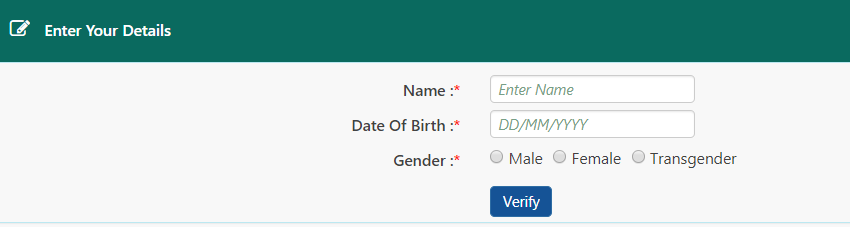
5. Provide the details of your Name, Date Of Birth, Gender and then click on “Verify” button

epf details

6. Select Aadhaar/PAN and enter your Aadhaar/PAN details for the sake of verification. Now tap on the “Verify” button to validate your request.

epf validate

7. After the validation of details, users can request to “Get OTP” by entering NEW Mobile Number

epf new mobile number

8. To users mobile number the OTP will be sent. Enter the OTP and click on the “Verify” button

9. Enter the new password and click on the “submit” button. And the new password must be entered twice.

10. The new password will be changed successfully.

How to Change Mobile Number in EPF Account Online

After your UAN and mobile number got registered, the EPF services will be done through the mobile number.

1. Visit the EPF member portal and login to the account with your UAN and password.

Change-Mobile-number-in-EPF-1

2. Now, select “Contact Details” in the “Manage” section

Change-Mobile-number-in-EPF-2

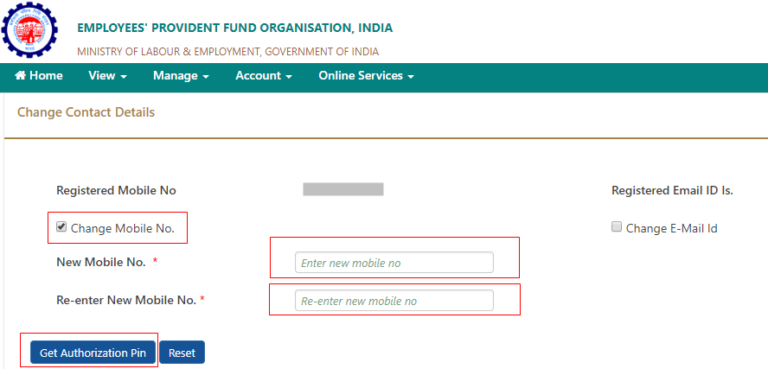
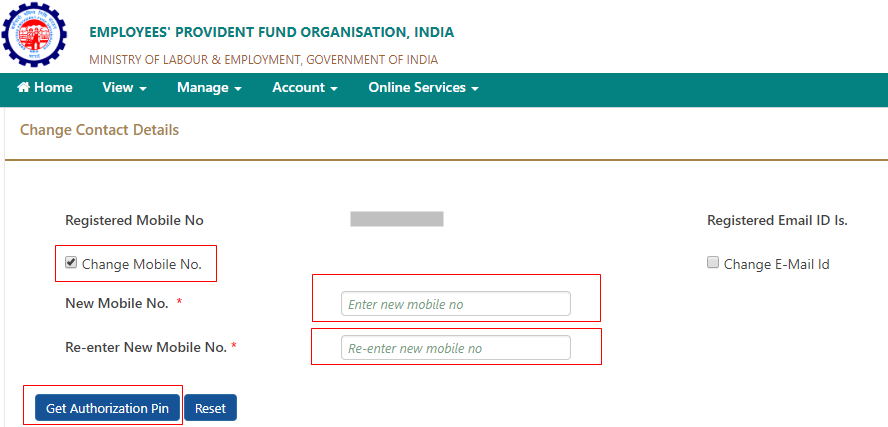
3. Now click on the “Check Mobile No.” option, in the provided space, you have to enter the mobile number twice. Now click on “Get Authorization Pin

Change-Mobile-number-in-EPF-3

4. The OTP is sent to this number

5. Enter this OTP and click on the “Submit” button

6. That’s it, your updated mobile number will be updated in the EPF portal

EPF Balance Check on mobile Using UAN

Know Your balance: Missed Call Facility

Members registered on the UAN portal may get their details available with EPFO by giving a missed call to 011-22901406 from their registered Mobile number.

If the UAN of the member is seeded with any one of the Bank A/C number, AADHAAR and PAN the member will get details of last contribution and PF Balance.

  • Give Missed call from registered mobile number to 01122901406
  • Call automatically gets disconnected after two rings
  • No cost to the member to avail this service

Short Code SMS Service

UAN activated Members may know their latest PF contribution and balance available with EPFO by sending an SMS at 7738299899 from registered mobile number.

“EPFOHO UAN” to 7738299899.

The facility is available in English (default) and Hindi, Punjabi, Guajarati, Marathi, Kannada, Telugu, Tamil, Malayalam and Bengali.

For receiving the SMS in any of the languages other than English, first three characters of the preferred language needs to be added after UAN.

For example, to receive in SMS in Telugu then SMS to be send will be

“EPFOHO UAN TEL” to 7738299899.

  • SMS should be sent from the registered mobile number of UAN.
  • EPFO sends last PF contribution and balance details of the member along with available KYC information.
  • Facility is available in 10 (ten) languages.

LANGUAGES SUPPORTED

1. English – Default
2. Hindi – HIN
3. Punjabi – PUN
4. Gujarati – GUJ
5. Marathi – MAR
6. Kannada – KAN
7. Telugu – TEL
8. Tamil – TAM
9. Malayalam – MAL
10.Bengali – BEN

EPF Services through Mobile

  • EPF Details
  • Your UAN and it’s status (Active or inactive)
  • EPF Balance
  • OTP service for authentication
  • Bank account, PAN and Aadhaar linking status
  • EPF transfer/withdrawal status
  • Last contribution

EPFO services are now available on the UMANG (Unified Mobile APP for New Governance). The UMANG APP can be downloaded by giving a missed call 9718397183. The APP can also be downloaded from UMANG website or from the play/app stores. Erstwhile EPF mobile services are being discontinued

OUCET 2019 Application Form, Notification, Exam Dates – Apply Online @ oucet.ouadmissions.com

OUCET 2019 Online Application Form, Notification, Exam Dates: Osmania University Common Entrance Tests 2019 Notification has to be released, the eligible candidates can apply Online at oucet.ouadmissions.com. Online Applications are invited from the candidates who have passed or appearing for the final year examination in the qualifying degree for entrance tests and admission into various P.G. Courses, P.G. Diploma Courses and 5 yr. Integrated Programmes offered by Osmania, Telangana, Mahatma Gandhi and Palamuru Universities in their campus, constituent and affiliated colleges for the academic year 2019 – 2020.

OUCET 2019 Application Form, Notification, Exam Dates – Apply Online @ oucet.ouadmissions.com

Notification of OUCET-2019: Osmania University Common Entrance Tests (OUCET) are being conducted by Osmania University for admissions into various PG, PG Diploma and 5-Year Integrated Programmes offered by Osmania, Telangana, Mahatma Gandhi and Palamuru Universities. The Directorate of Admissions, Osmania University has been successfully carrying out the gigantic task of conducting entrance tests and admissions into various courses offered by the University and its affiliating institutions since 2000-2001 academic year. The Registration and Submission of online application involves following four steps: 1) Registration and Fee Payment, 2) Uploading of colored Photo, Signature and Certificates (if applicable), 3) Filling up of application and 4) Submission.

IMPORTANT DATES

Date of commencement of online registration & submission of applications : –

Last date for submitting the online application : –

Last date with a late fee of Rs.200/- : –

Last date with a late fee of Rs.1000/- : —-

Commencement of entrance tests: —-

OUCET 2019 Apply Online Application Form Registration at oucet.ouadmissions.com

Before going for filling up of online application, the candidates must be ready with following scanned copies in soft form for uploading.

1) Colored Passport Photograph with maximum of 40kb size.

2) Signature with maximum of 30kb size.

Registration Fee for a single subject is Rs.700/- for OC/BC candidates and Rs.575/- for SC/ST/PH candidates. For each additional subject, the fee is Rs.450/- for all categories. The fee may be paid at any TS/AP online centers or through payment gateway (Credit / Debit Cards / Net Banking). For submission of online application, visit the above websites.

Apply Online

Notification Pdf (Available Soon)

For further details, go through the Information Brochure available in the websites, www.ouadmissions.com or www.osmania.ac.in.