
JNTUH Pre-Ph.D/ Pre-M.Phill /Pre-MS Supply Exam Notification Aug 2016
JNTUH Pre-Ph.D/ Pre-M.Phill /Pre-MS Supply Exam Notification Aug 2016

JNTUH Pre-Ph.D/ Pre-M.Phill /Pre-MS Supply Exam Notification Aug 2016

Supplementary Examinations for the Pre-Ph.D/Pre-M.Phill/Pre-MS will be held on 20th & 22nd AUGUST – 2016 from 2:00 PM to 5:00 PM for Paper-I and Paper-II respectively.

Registration for the Pre-Ph.D/ Pre-M.Phill /Pre-MS.

The students who appear for the above examinations are to note that the on-line registration for University exam will be carried out as per the time schedule given below.

Fee Particulars :

  • Examination Fee  : Rs. 2000/-
  • On – line registration without late fee : 12-07-2016 – 28-07-2016
  • Registration with 100/- late fee : 29-07-2016 – 05-08-2016
  • Registration with late fee of 2000/- : 06-08-2016 – 12-08-2016

INSTRUCTIONS TO THE CANDIDATES

Online Registration particulars and procedure:

The Pre-Ph.D/Pre-M.Phill/Pre-MS students who wish to apply for the University examination are informed to note the following procedure for selecting the subjects of Paper-I and Paper–II and for making the Exam fee payment of the of Pre-Ph.D/ Pre-M.Phill /Pre-MS examinations.

1. Visit the University Examinations portal at the URL :  http://epayments.jntuh.ac.in/prephd-prems

2. Create your registration account before carrying out Pre-Ph.D/Pre-M.S subject registration, if you have not registered earlier.

3. Upload your pass-port size digital photograph while doing registrations. (If not uploaded earlier.) Ensure that the quality of the digital photo is very good. The uploaded photograph must be in the jpg (JPEG) format. If it is in other format, it should be converted to JPEG format and photo file size should not exceed 2MB.

4. Obtain the printout of the Pdf file corresponding to your subject registration details from the same registrations portal.

5. Make the payment online, either by using the payment gateway using VISA/Master Card or by using the SBH online challan.

6. The photo copy PDF receipt generated (in case of payment by payment-gateway) or the University copy of the SBH challan (in case of challan payment) should be taken.

7. The copy of the printout of the registration receipt (item 4 above) and the payment receipt (as in item 6 above) should be tagged/stapled and send it by post/ in person to ACE(O), Second Floor, Examination Building, JNTU Hyderabad, Kukatpally, Hyderabad, 500 085”

8. The students are informed to download the hall-tickets from the same portal using the ‘Download Hall-ticket’ service from 5 days before start of examinations.

9. For any queries related to online registration/payments please contact SDC at the Phone no: 9989980170, 9704033577.

General Instructions:

All the candidates are informed to carry their identity cards, while writing their examinations and whenever they visit the Directorate of Research & Development Cell for any query or for getting any certificates/marks memos.

1. The candidates are held personally responsible for all the entries made in the online application form/Hall-ticket and any incorrect information or information suppressed will entitle disciplinary action against the candidates.

2. The Results of examinations will be informed only through website www.jntuh.ac.in. The original marks memos can be collected from the Directorate of Research & Development Cell, after the declaration of the results.

3. Examination centre for Pre-Ph.D/Pre-M.Phill/Pre-MS examinations is in the University campus at JNTUH College of Engineering, Kukatpally, Hyderabad.

4. There is no Re-counting and Re-valuation of Answer Scripts for Pre-Ph.D Examinations.

JNTUH MBA I, II, III, IV Semesters Regular/Supply Exam Fee Notification Aug 2016

JNTUH MBA I, II, III, IV Semesters Regular/Supply Exam Fee Notification Aug 2016, jntu hyderabad mba end examination fee notification 2016.

JNTUH MBA I, II, III, IV Semesters Regular/Supply Exam Fee Notification Aug 2016

JNTUH MBA I, II, III, IV Semesters Regular/Supply Exam Fee Notification Aug 2016

Sub: JNTUH, Hyderabad-Examination Branch-MBA Examinations Aug/Sept-2016-Notification – Instructions to the Principals – Reg.

The Notification is hereby issued for the II & IV semester Regular University examinations and Supplementary University examinations of I &III semesters of MBA course. You are requested to note the following schedule of events associated with the Regular/Supplementary Examinations of MBA course. These Examinations are scheduled to be held in the month of Aug/Sept – 2016.

The Following Exam Notifications are issued by JNTUH :

1. MBA – I SEMESTER – (R15/R13/R09) SUPPLY- AUGUST / SEPT- 2016 (R15-2015 BATCHES,R13 – 2013, 2014 BATCHES ,R09 – 2010, 2011, 2012 BATCHES )

2. MBA – II SEMESTER – (R15/R13/R09 ) REGULAR/SUPPLY – AUGUST / SEPT- 2016 (R15-2015 BATCHES, R13-2013,2014 BATCH ,R09 – 2010, 2011, 2012 BATCHES )

3. MBA – III SEMESTER – (R13/R09) SUPPLY- AUGUST / SEPT- 2016 (R13 – 2013, 2014 BATCHES ,R09 – 2010, 2011, 2012 BATCHES )

4. MBA – IV SEMESTER – (R13/R09) SUPPLEMENTARY – AUGUST / SEPT- 2016 (R13 – 2013, 2014 BATCHES ,R09 – 2010, 2011, 2012 BATCHES )

The students who appear for the above examinations commencing from 29-08-2016 [I & II Semesters] & 22-08-2016 [III & IV Semester] are to note that the on-line registration for University examinations will be carried out as per the time schedule

Exam Registration & Last Dates :

  • Without Late Fee : 18-07-2016 to 25-07-2016
  • With Late Fee of Rs. 100 /- : 26-07-2016 to 28-07-2016
  • With Late Fee of Rs. 1000 /- : 29-07-2016 to 02-08-2016

Download the Official Notification Here : Click Here

JNTUH MCA I, II, III, IV, V Semesters Regular/Supply Exam Fee Notification Aug 2016

JNTUH MCA I, II, III, IV, V Semesters Regular/Supply Exam Fee Notification Aug 2016, jntu hyderabad mca end examination fee notification 2016.

JNTUH MCA I, II, III, IV, V Semesters Regular/Supply Exam Fee Notification Aug 2016

JNTUH MCA I, II, III, IV, V Semesters Regular/Supply Exam Fee Notification Aug 2016

Sub: JNTUH, Hyderabad-Examination Branch-MCA Examinations Aug/Sept-2016-Notification – Instructions to the Principals – Reg.

The Notification is hereby issued for the II & IV semester Regular University examinations and Supplementary University examinations of I ,III& V semesters of MCA course. You are requested to note the following schedule of events associated with the Regular/Supplementary Examinations of MCA course. These Examinations are scheduled to be held in the month of Aug/Sept-2016.

The Following Exam Notifications are issued by JNTUH :

1. MCA – I SEMESTER – (R15/R13/R09/R06) SUPPLY – AUGUST/SEPT 2016 (R15-2015 BATCH, R13 – 2013 , 2014 BATCHES ,R09 – 2009, 2010, 2011, 2012 BATCHES,R06-2008 BATCH)

2. MCA – II SEMESTER – (R15/R13/R09/R06 ) REGULAR/SUPPLY – AUGUST/SEPT 2016 (R15-2015 BATCH, R13-2013,2014 BATCH ,R09 – 2009, 2010, 2011, 2012 BATCHES,R06-2008BATCH)

3. MCA – III SEMESTER – (R13/R09/R06) SUPPLY – AUGUST/SEPT 2016 (R13 – 2013, 2014 BATCHES ,R09 -2009, 2010, 2011, 2012 BATCHES,R06-2008BATCH)

4. MCA – IV SEMESTER – (R13/R09/R06 ) REGULAR/SUPPLY – AUGUST/SEPT 2016 (R13-2013,2014 BATCH ,R09 – 2009, 2010, 2011, 2012 BATCHES , R06- 2008 BATCH)

5. MCA – V SEMESTER – (R13/R09/R06) SUPPLY – AUGUST/SEPT 2016 (R13 – 2013, 2014 BATCH ,R09 – 2009,2010, 2011, 2012 BATCHES,R06-2008 BATCH)

The students who appear for the above examinations commencing from 29-08-2016 [I & II Semesters], 22-08-2016 [III & IV Semester] & 15-02-2016 [V Semester] are to note that the on- line registration for University examinations will be carried out as per the time schedule.

Exam Registration & Last Dates :

  • Without Late Fee : 18-07-2016 to 25-07-2016
  • With Late Fee of Rs. 100 /- : 26-07-2016 to 28-07-2016
  • With Late Fee of Rs. 1000 /- : 29-07-2016 to 02-08-2016

Download the Official Notification Here : Click Here

JNTUK M.Tech/M.Pharmacy II Sem Regular/Supply Lab Exam Schedule July 2016

JNTUK M.Tech/M.Pharmacy II Sem Regular/Supply Lab Exam Schedule July 2016

JNTUK M.Tech/M.Pharmacy II Sem Regular/Supply Lab Exam Schedule July 2016

Sub: JNTUK – Examination Branch – Conduct of Laboratory Examinations – Intimation of dates – Regarding.

All the Principals of the affiliated colleges are hereby informed that the following Laboratory Examinations are scheduled to be conducted in respective colleges without disturbing the regular class works as detailed below. Hence, the Principals are requested to make necessary arrangement for smooth conduct of the examinations.

JNTUK M.Tech-M.Pharmacy II Sem Exam Lab Exam Schedule July 2016

The above laboratory examinations reports are to be submitted to the Controller of Examinations Office, JNTUK, Kakinada in person to the above mentioned dates without fail.

JNTU Hyderabad Grants affiliation to 158 Engineering Colleges & 46 Pharmacy Colleges

0

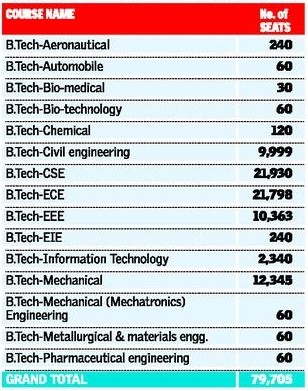
JNTU Hyderabad : A large number of engineering colleges lost out on affiliation for the academic year 2016-17. In a press note issued late on evening on Sunday, JNTU registrar N. Yadaiah said 158 engineering colleges were given affiliation. With this the number of seats available for B.Tech first year students will be 79,705 seats.

JNTU Hyderabad Grants affiliation to 158 Engineering Colleges & 46 Pharmacy Colleges

Engineering Colleges : The maximum seats are in Computer Science Engineering (21,930) followed by Electronics and Communications Engineering (21,798) seats. For the Academic year 2016-17, a total of 360 private colleges, including 241 engineering colleges, 89 pharmacy colleges, and 30 MBA standalone, have applied to JNTUH for affiliation. Among them 158 engineering colleges have been granted provisional affiliation with one or more branches with a total of 671 courses and 79,705 seats.

List of Colleges In TS EAMCET – 2016 (Updated on 5th July 2016)

List of Courses In TS EAMCET – 2016 (Updated on 5th July 2016)

Pharmacy colleges : A total of 46 pharmacy colleges were granted affiliation with 4,000 seats.

JNTU Hyderabad Grants affiliation to 158 Engineering Colleges & 46 Pharmacy Colleges

This year 1.44 lakh students have qualified in the state of Telangana, Out of them 63,777 were made certification. They are eligible to fill the web options.

Affiliation Notification for Osmania and Kakatiya Universities is going to be released on today, 04th July. In both the universities, there are 14 thousand seats available on aggregate and in which 10 thousand seats will be sanctioned by the Government. With this, there is a chance for overall 90 Thousand Engineering seats this year.

Source : The Hindu

AP PGECET 2016 Web Options Step by Step Procedure @ pgecet.apsche.ac.in

9

AP PGECET 2016 Web Options Step by Step Procedure @ pgecet.apsche.ac.in, andhra pradesh pgecet 2016 Procedure to exercise Web options along with screen shots.

AP PGECET 2016 Web Options Step by Step Procedure @ pgecet.apsche.ac.in

AP PGECET 2016 Web Options : The GATE qualified and eligible candidates of 2015 and 2016, GPAT and AP PGECET qualified and eligible candidates of 2016 are informed to attend AP PGEC/AP PGECET web counselling for admission into ME/M.Tech/M.Pharmacy courses for the academic year 2016- 17 as per the schedule given below at any one of the Help Line Centres.

APPGEC/APPGECET – 2016 Admissions

PROCEDURE TO EXERCISE OPTIONS

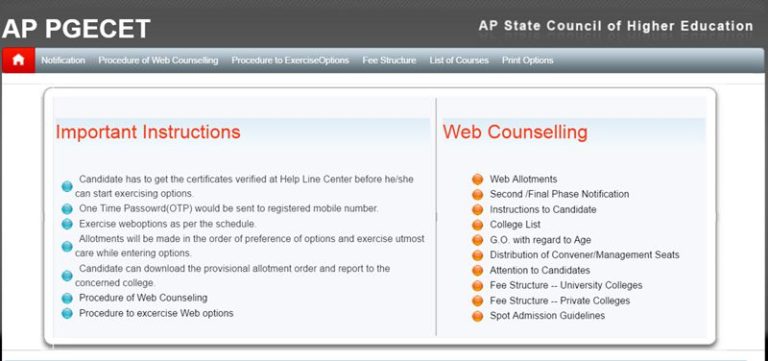
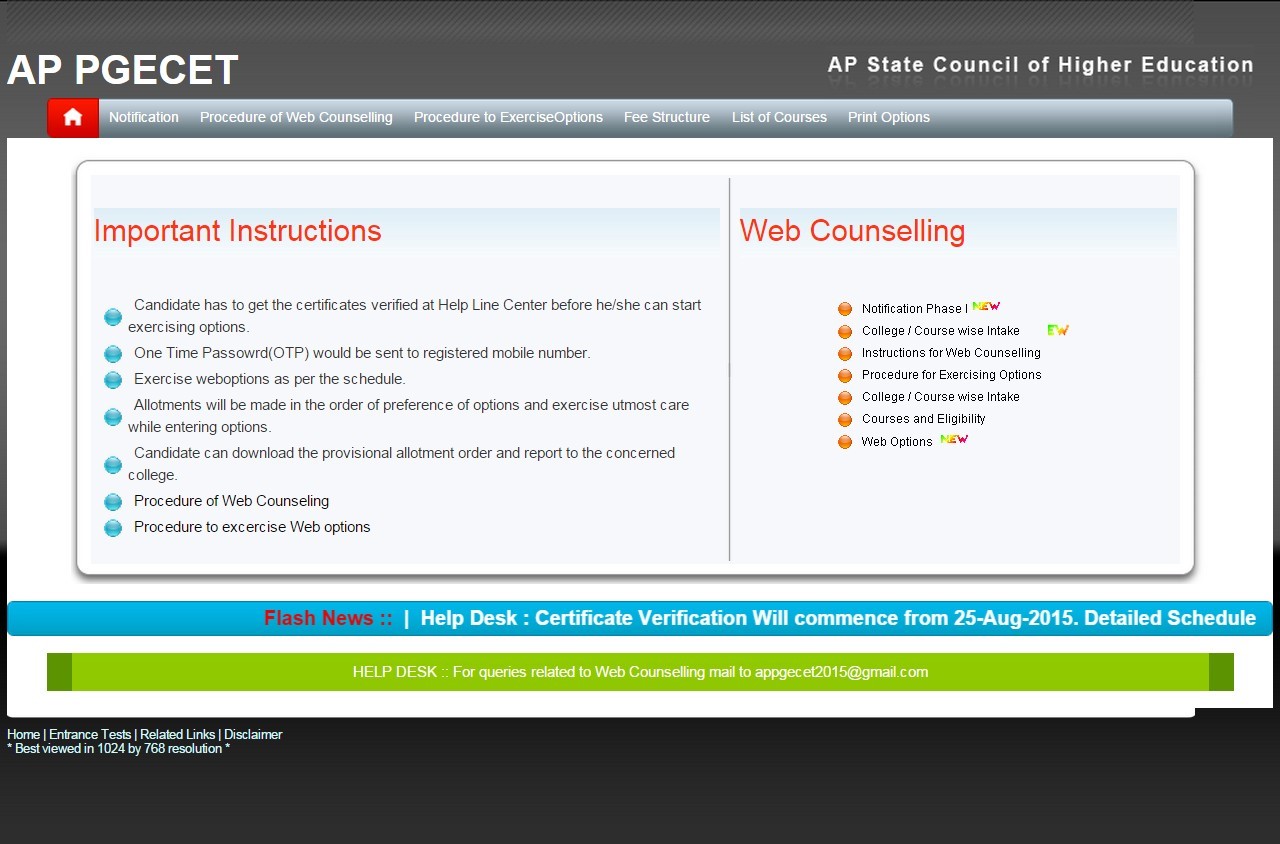
1. Open the website http://appgecet.apsche.ac.in. Home page displayed as follows.

ap pgecet 2015 web options-1

2. Click on the Web Options link for Exercising options.

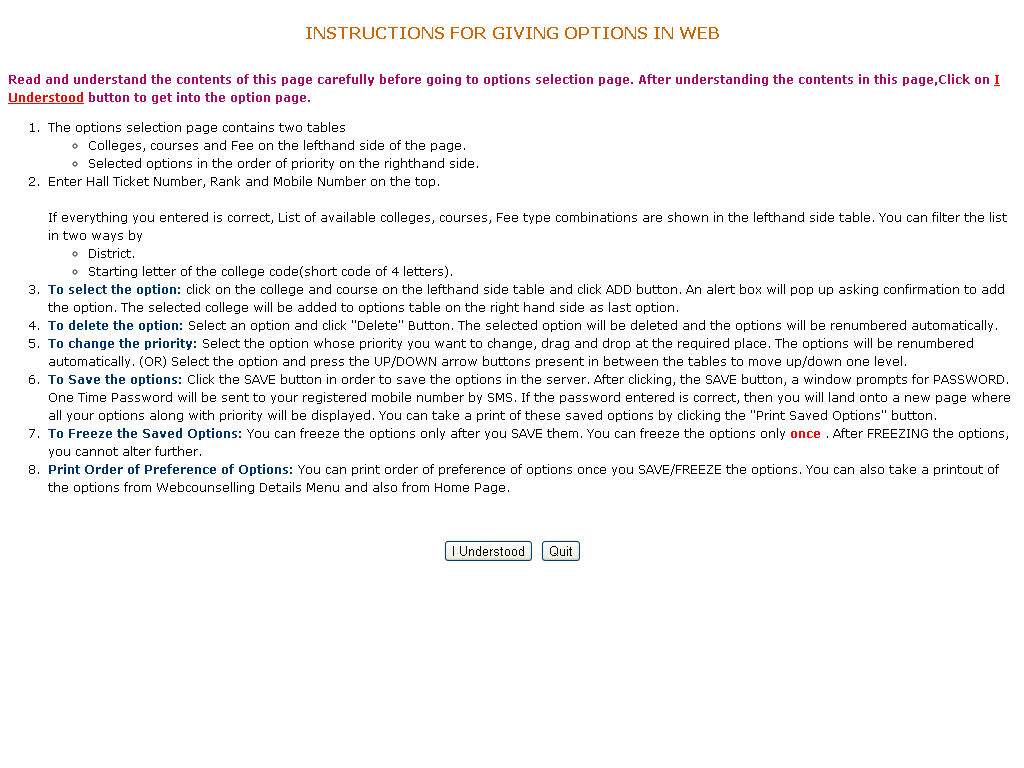
3. Instructions to candidate window will be displayed as follows.

ap pgecet 2015 web options-2   

4. Read the instructions carefully, then click I Understood button.

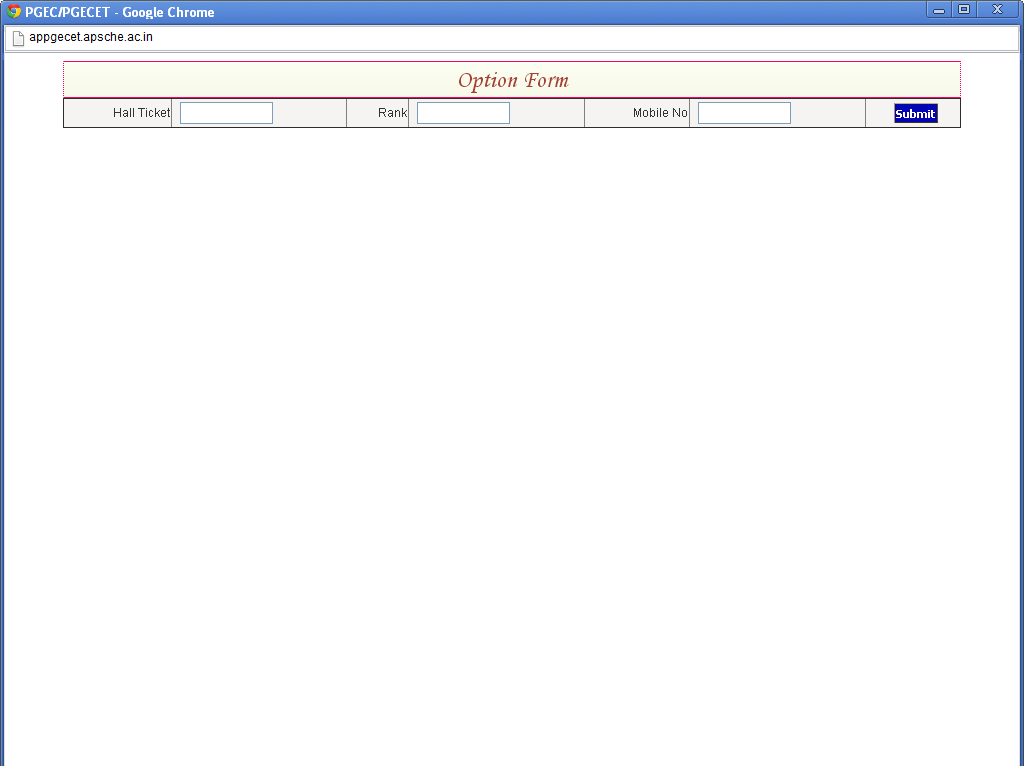
5. Enter the details as shown in the option form and click on Submit button.

ap pgecet 2015 web options-3

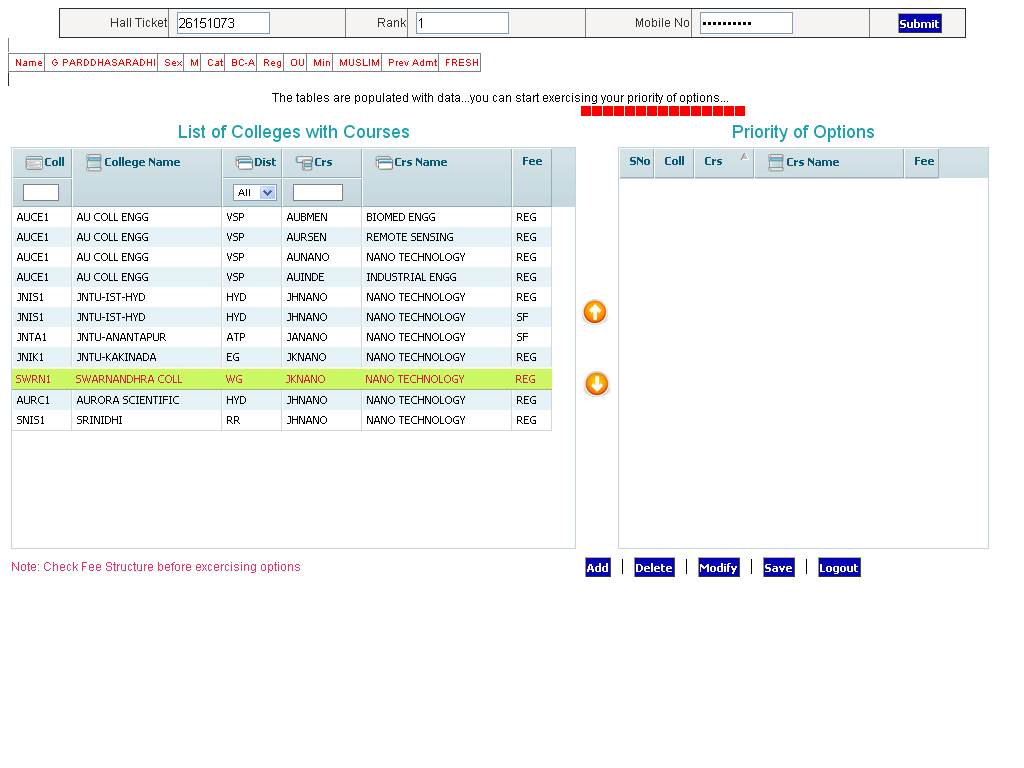
6. Option form will be displayed as shown below with colleges on the left side. This window displays all the eligible colleges based on gender and specialization.

ap pgecet 2015 web options-4

⇒Two types of filters are available to minimize the selection list. The first filter is Alphabetical order and another filter as per the District.

⇒For example, if you select Hyderabad District in the District combo box, the list of colleges available in Hyderabad

⇒District alone will be displayed.

⇒If you Type one of the Alphabets, for example “P” is Typed, then the college codes starting with alphabet “P” will be displayed.

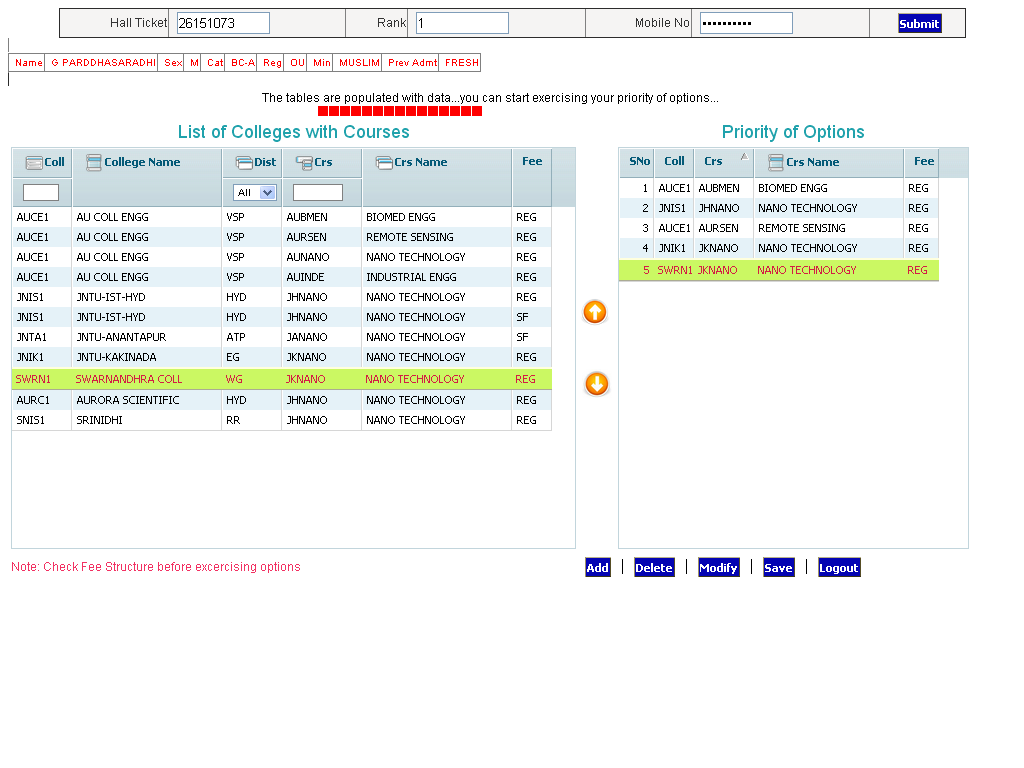
⇒Select the college on left window and click to add to the right side window as option number one. Then next one will be added as second option and so on. The priority of options is displayed on the right side window.

⇒You can Modify the priority of options by clicking on the Modify button. Select an option, drag it to the required place and drop. Automatically the option will be moved to the new location and the priority numbers will be renumbered. (OR) Select the option and press the UP/DOWN arrow buttons present in between the tables to move up/down one level.

⇒ Select an option and Click the Delete button, then the option will be deleted from the selected list.

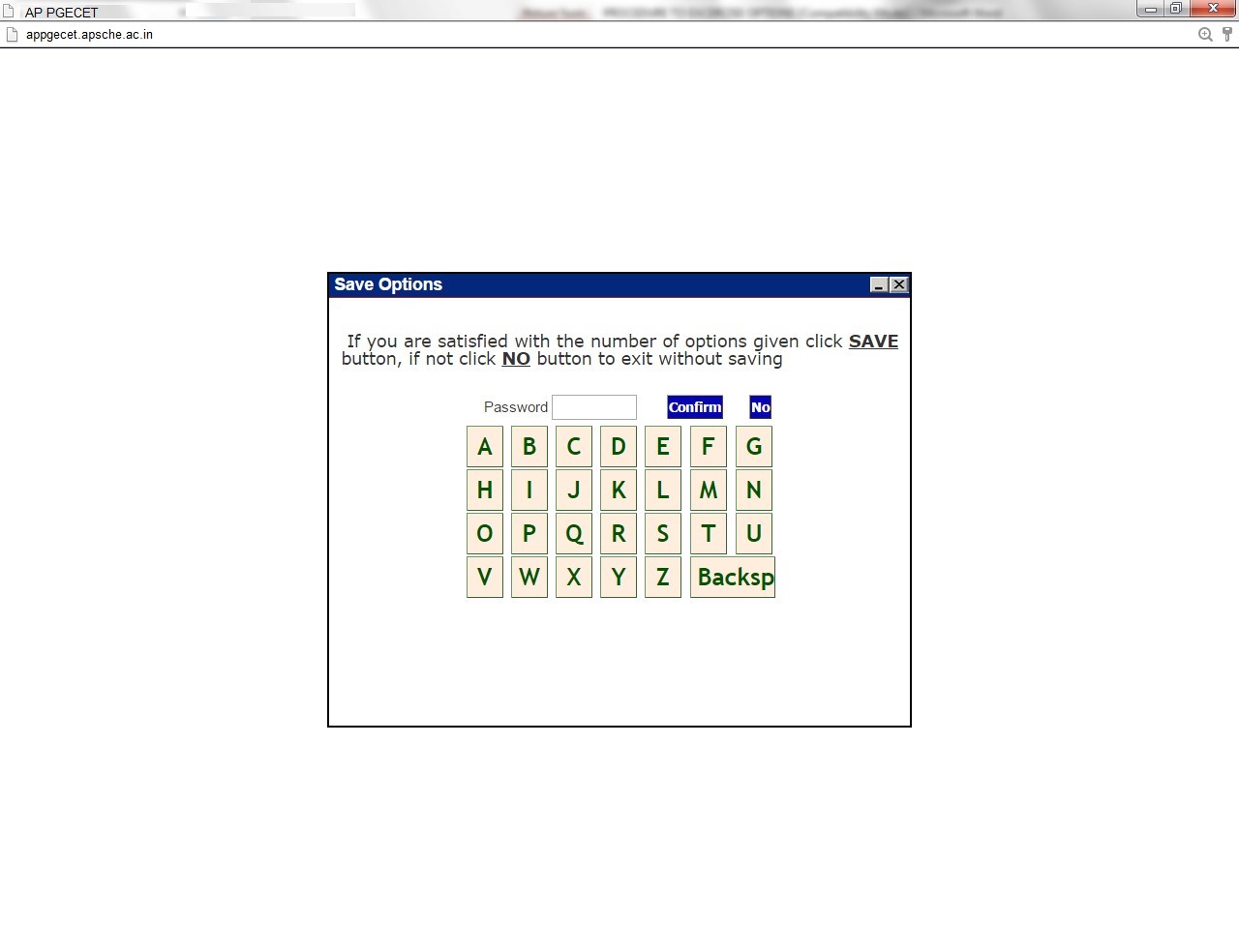
⇒After satisfying with the selected list of colleges and their priorities, click on Save button and enter the password through the virtual key board available on the screen which you have received by SMS and click Confirm button, then the selected options are saved in the Server for processing, and the saved options will be displayed in printed format. Take a print and verify thoroughly the colleges and their priority.

ap pgecet 2015 web options-5

ap pgecet 2015 web options-6

ap pgecet 2015 web options-7

7. The Saved options can be viewed and/or print  through the Print options link from home page also.

8. The options exercised will be closed at 00.00 Hrs mid night on the last date specified for web options in the notification.

9. The options registered in the server will be frozen automatically on the last day specified in the notification and shall be used for seat allotment.

10. The options will be processed on the dates specified and the results will be communicated through SMS message to the mobile number, which you have provided and you can also take a print of the provisional allotment order from the website.

Do’s and Don’ts

  • Do not use mobiles and tablets to exercise the options. Use only computers.
  • Check college codes thoroughly before entering options
  • Write college codes in the order of preference on a white paper before entering into web.
  • Do not select colleges which you are not interested.
  • Avoid using slow internet facility.
  • Allotments will be made in the order of preference of options and exercise utmost care while entering options.
  • Allotments will be made in the rank order
  • Allotment made in the web counselling is final and cannot be altered under any circumstances.
  • Therefore only such colleges and courses that candidate will join without any hesitation should be chosen.
  • Convenor is not responsible for any technical or human errors from client side (Student side) while exercising options.
  • Keep your mobile with you while exercising options and do not block SMS.

Download Official Notification Here : Appgecet 2016 web procedure PDf (Available soon)

JNTUK M.Tech 2nd Sem (R13) Regular Question Papers Sept 2014

JNTUK M.Tech 2nd Sem (R13) Regular Question Papers Sept 2014. jntu kakinada m.tech II sem previous question papers download.

JNTUK M.Tech 2nd Sem (R13) Regular Question Papers Sept 2014

JNTUK M.Tech 2nd Sem (R13) Regular Question Papers Sept 2014

JNTUK M.Tech 2nd Sem Question papers : We are Providing M.Tech R13 Regulation all semester’s regular and supplementary examination previous question papers. Students those who are searching for m.tech second semester previous question papers, can download from below provided links. If you are facing any problem in downloading question papers please comment below.

JNTUK M.Tech 2nd sem Previous Question papers For R13 Regulation

SIMULATION MODELING OF MANUFACTURING SYSTEMS

CODING THEORY AND APPLICATIONS

ADVANCED UNIX PROGRAMMING


DATA WAREHOUSING AND DATA MINING

WIRELESS COMMUNICATION AND NETWORKS


FINITE ELEMENT METHOD

IMAGE AND VIDEO PROCESSING

OBJECT ORIENTED ANALYSIS AND DESIGN


COMPUTER GRAPHICS

HUMAN COMPUTER INTERACTION

ADVANCED COMPUTER ARCHITECTURE

COMPUTER NETWORKS


MATERIALS TECHNOLOGY

OPTIMIZATION AND RELIABILITY

DIGITAL SIGNAL PROCESSORS & ARCHITECTURES


INFORMATION SECURITY

EMBEDDED REAL TIME OPERATING SYSTEMS

QUALITY ENGINEEING IN MANUFACATURING

Also Download : M.Tech 1st sem & 2nd Sem Question papers colletion

JNTUK M.Tech 2nd Sem (R13) Regular Question Papers Oct 2015

JNTUK M.Tech 2nd Sem (R13) Regular Question Papers Oct 2015. jntu kakinada m.tech II sem previous question papers download 2016.

JNTUK M.Tech 2nd Sem (R13) Regular Question Papers Oct 2015

JNTUK M.Tech 2nd Sem (R13) Regular Question Papers Oct 2015

JNTUK M.Tech 2nd Sem Question papers : We are Providing M.Tech R13 Regulation all semester’s regular and supplementary examination previous question papers. Students those who are searching for m.tech second semester previous question papers, can download from below provided links. If you are facing any problem in downloading question papers please comment below.

JNTUK M.Tech 2nd sem Previous Question papers For R13 Regulation

SIMULATION MODELING OF MANUFACTURING SYSTEMS

CODING THEORY AND APPLICATIONS

ADVANCED UNIX PROGRAMMING

SWITCHED MODE POWER CONVERSION


DATA WAREHOUSING AND DATA MINING

CUSTOM POWER DEVICES

WIRELESS COMMUNICATION AND NETWORKS


FINITE ELEMENT METHOD

DIGITAL CONTROLLERS

IMAGE AND VIDEO PROCESSING

OBJECT ORIENTED ANALYSIS AND DESIGN


COMPUTER GRAPHICS

HUMAN COMPUTER INTERACTION

ELECTRIC DRIVES – II


ADVANCED COMPUTER ARCHITECTURE

ELECTRICAL DISTRIBUTION SYSTEMS

COMPUTER NETWORKS


MATERIALS TECHNOLOGY

SPECIAL MACHINES


DIGITAL SIGNAL PROCESSORS & ARCHITECTURES


OPTIMIZATION AND RELIABILITY

ADVANCED MECHANICS OF SOLIDS


INFORMATION SECURITY

EMBEDDED REAL TIME OPERATING SYSTEMS

QUALITY ENGINEERING IN MANUFACTURING

Also Download : M.Tech 1st sem & 2nd Sem Question papers colletion

AP Epass Renewal 2016-17 Application Registration Procedure – Apply Here

265

AP Epass Renewal Application 2016-17 Registration Procedure : Andhra Pradesh Postmatric Scholarships For Renewal Registration 2016-17 opened. The eligible students to get e-pass Scholarship can apply online through, www.apepass.cgg.gov.in.

AP Epass Renewal 2016-17 Application Registration Procedure

AP Epass 2016-17 Renewal Procedure : AP Postmatric Scholarships (Epass) For Renewal Registration date released, it is For 2016-2017 Academic Year. Andhra Pradesh Govt. is providing financial assistance to students who belong to economically backward section. The reservation candidates belongs to SC/ST/BC categories with lower income levels are eligible to claim e-pass scholarship. The students who are pursuing their undergraduate courses in state of Andhra Pradesh are eligible to get the scholarship from AP Govt. The eligible students to get e-pass Scholarship can apply online through, www.telanganaepass.cgg.gov.in. AP Government has announced scholarship notification for students for the year 2016-2017. The candidates who are eligible to claim scholarship have been already applied through online within the specified dates announced by the AP Govt. Now students can get updated with their e-pass scholarship status 2016 on the Official Website of AP Govt. www.apepass.cgg.gov.in.

Like Our Official Epass Facebook Page For Latest Updates – Click Here

 Registrations will be Closed on 15-08-2016 

Also Check : AP Epass Fresh Application 2015-16 Registration Procedure

AP Epass Renewal Application 2016-17 Procedure :

For Applying The Epass Scholarship Renewal Registration, we need some documents for further verifications, its for all the castes those who are poor. So many Students are not aware of Epass Scholarship Renewal Registration. It is very careful while applying because without having careful you application must not approve. So for the students sake we are showing step by step process.

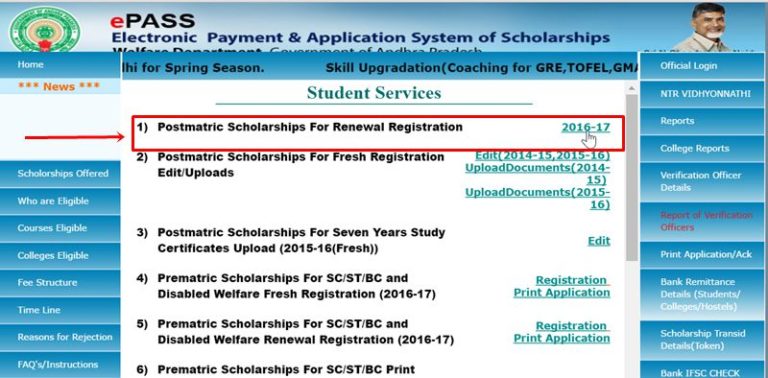
STEP 1:

If you are From Andhra Pradesh then Open : https://apepass.cgg.gov.in and Click on “Student Services Icon”

ap epass Student Services

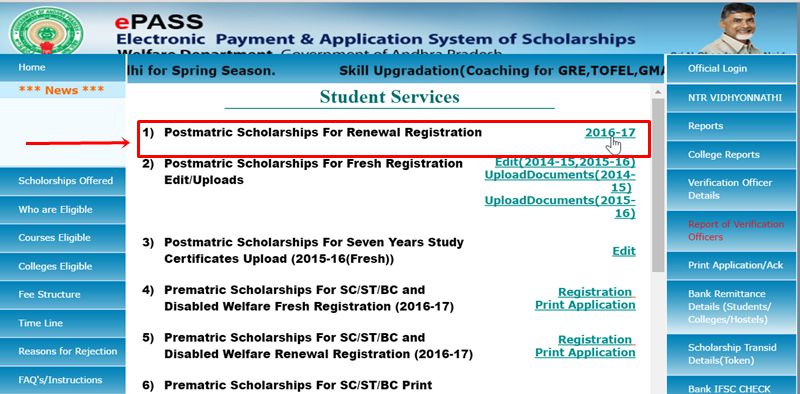
STEP 2:

Click on ” 2016-17” Link.

ap epass renewal 2016-17

Step 3 :

 Prerequisites for Existing Application Process for the Academic Year 2016-17 

1) a) All the Students Registering on the epass website must have a Aadhar card of Self

b)If you do not have Aadhar Card, go to the nearest Aadhar Enrollment centre for Enrollment .

c) If you have enrolled for Aadhar and have Enrollment Number(EID). with you, then verify your Aadhar status.Click Here to verify status of Aadhaar)

2) Incase of change of Bank account, open your Zero balance account in any of the nationalized banks (Click here for the list of nationalised banks). Bank account not required For EBC students.

3)Student should have a Mobile Number for receiving One Time Password for registration (Mobile number may belong to the student or any one of his/her family members).

Documents to be Scanned compulsorily For Renewal Registration Process for the Academic Year 2015-16 (Please tick the following check boxes to proceed.)
  • Bank Pass Book first page with Bank Account number and IFS Code incase of change.(Not Required For EBC Students)
  • Passed/Promoted Marks Memo of Previous year.
  • Original Income Affidavit (signed by the Student & the Parent) Download format for affidavit.

Note: If Any Problem in getting Password to Your Mobile, Go to nearest Meeseva/eSeva/APonline Centers For Registering With out Password.

Step 4:

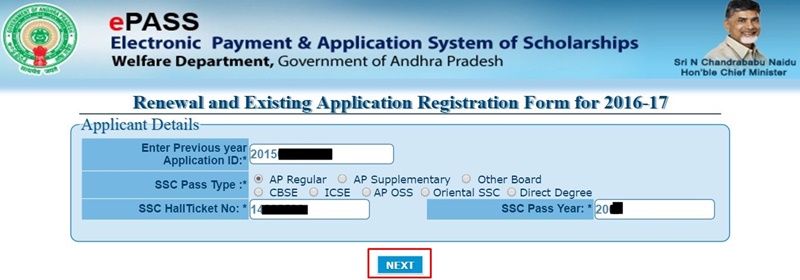
After Click On Apply Now Button, You Have to Log in with the Details :

  • Previous year Application ID
  • SSC Pass Type (AP Regular, AP Supplementary, Other Board, CBSE, ICSE, AP OSS, Oriental SSC, Direct Degree)
  • SSC HallTicket No
  • SSC Pass Year

ap epass 2016-17 login page

Step : 5

After Click on the NEXT Button, you will get your ” Previous Year EPASS Details“. Then You Change any Information like Mobile No, College Details, Scholarship Type, Permanent Address, Email ID..etc.

Upload Documents

  • Upload Previous year Passed / Promoted Scanned Memo (Max Size:100KB)
  • Upload Scanned Income Affidavit (signed by Student & Parent) (Max Size:100KB)

Finally Click On the “CONFIRM DETAILS” Button.

Last Date For AP Epass Scholarship Renewal Registration is :

Contact Details: For Technical Issues-040-23120411,23120412 & General Issues-040-23399863 (Calls will be answered between 10:30 A.M. to 5 P.M. on Working Days)

AP Epass Scholarship Renewal Registration 2016-17 – Apply Here

65

AP Epass Scholarship Renewal Registration 2016-17 – Apply Here, Epass application last date, epass renewal 2016-2017, jntuk epass scholarship apepass.cgg.gov.in.

NOTE: AP EPASS Renewal Registration 2016-17 are Opened.

EPASS Application Fully Supported in Mozilla Firefox and Internet Explorer Version 8 Above.

ie8and mozilla

AP Epass Scholarship Application released and Last Date Also Released. it is For 2014-2015 Academic Year. Andhra Pradesh Govt. is providing financial assistance to students who belong to economically backward section. The reservation candidates belongs to SC/ST/BC categories with lower income levels are eligible to claim e-pass scholarship.   The students who are pursuing their undergraduate courses in state of AP are eligible to get the scholarship from AP Govt. The eligible students to get  e-pass Scholarship can apply online through, www.apepass.cgg.gov.in. AP Govt. has announced scholarship notification for students for the year 2014-2015. The candidates who are eligible to claim scholarship have been already applied through online within the specified dates announced by the AP Govt. Now students can get updated with their e-pass scholarship status 2014 on the Official Website of AP Govt. , www.apepass.cgg.gov.in.

AP Epass Renewal 2016-17 Application Registration Procedure

Also Check : Telangana Epass For Renewal Registration 2015-16

               Telangana Epass For Fresh Registration 2015-16

For Applying The Epass Scholarship Renewal Registration we need some documents for further verifications.its for all the castes those who are poor .So many Students are not aware of Epass Scholarship Renewal Registration.it is very careful while applying because without having careful you application must not approve. so for the students  sake we are showing step by step process.