JNTUK Duplicate Migration Certificate Apply Online @ jntuksdc.co.in

JNTUK Duplicate Migration Certificate Apply Online @ jntuksdc.co.in

JNTUK Procedure to apply for Migration Correction through Online

Follow the steps below to apply for a Migration duplicate certificate and submit the document at the counter, Examination Center, JNTUK.

Required Documents

  1. Xerox copy of SSC certificate
  2. Xerox copy of PC
  3. Xerox copy of CMM (Required for UG)
  4. Xerox copies of Marks Memos (Required for PG)
  5. Xerox copy of Migration Certificate
  6. Xerox copy of Aadhaar Card.
  7. Recent passport size color photograph
  8. Xerox copy of online payment for a duplicate of the Migration certificate

JNTUK Apply online For Duplicate Migration Certificate

1. Visit, JNTUK Official Website i.e., https://jntuksdc.co.in

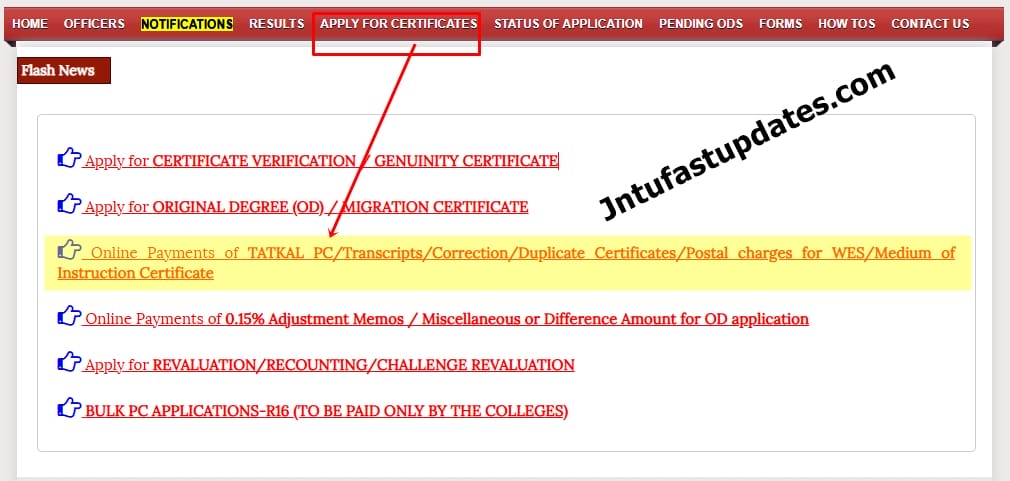
2. Click on the link ‘Online Payments of TATKAL PC / Transcripts / Correction / Duplicate Certificates / Postal charges for WES / Medium of Instruction Certificate

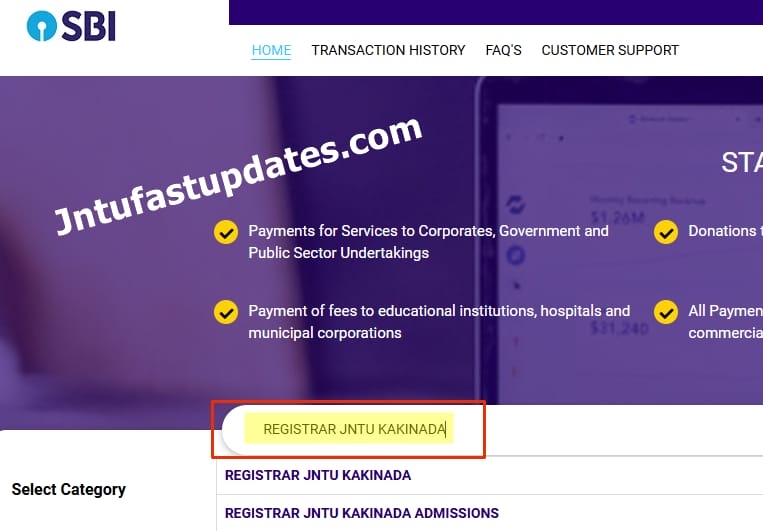
3. Search for “REGISTRAR JNTU KAKINADA

4. Select ‘Payment Category‘ like

  • CMM Correction
  • DUPLICATE MARKS MEMOS
  • DUPLICATE OD
  • Discrepancy
  • Duplicate CMM
  • Duplicate Memo for 0.15 percent adjustment
  • Duplicate Migration Certificate
  • Duplicate Provisional Certificate
  • MARKS MEMO CORRECTIONS
  • Medium of Instruction Certificate
  • Migration Certificate Name Correction
  • Miscellaneous Amounts
  • Normal Provisional Certificate(Rs. 200/-)
  • ORIGINAL DEGREE CORRECTION
  • Postal Charges for WES
  • Provisional Certificate Correction
  • Transcripts
  • WES/CES/ICES/IQAS/NCEES/SPANTRAN VERIFICATION
  • TATKAL PC

5. Fill the required details in the application page

6. Make the payment

  • The payment amount is Rs. 300/- for a duplicate of Migration certificate
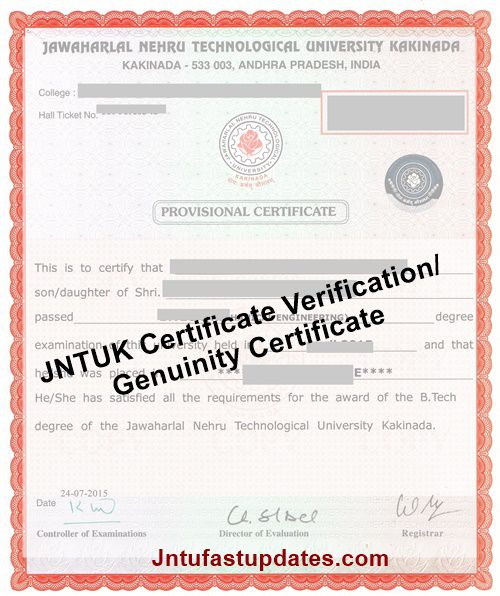
JNTUK Certificate Verification/Genuinity Certificate Apply Online @ jntuksdc.co.in

JNTUK Certificate Verification/Genuinity Certificate: This Service is intended for verification of genuinity of the JNTUK issued certificates uploaded by the requested user. By Using this service requested user can check Genuinity of PC, CMM, OD, Marks Memos, MG Cerificates.

JNTUK Certificate Verification/Genuinity Certificate Apply Online @ jntuksdc.co.in

  1. This facility is extended to verify the Genuinity of Documents to Universities, Organisations, Third party agencies and Individuals on payment basis.
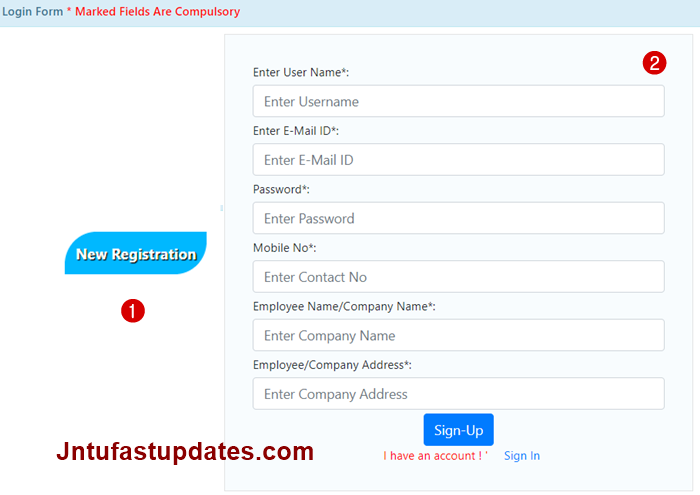
  2. Click on New Registration link to apply online verification for new users.
  3. This Service is currently limited to Indian National Rupee only.
  4. Hall Ticket number is mandatory to avail this service.
  5. For any queries, you can call to 0884-2300942

The fee for the verification of certificates for foreign verification agencies is increased to Rs 2000 and for domestic verifications is increased to Rs 1000. Fee once paid aganist a candidate cannot be exchanged, cancelled or refunded.

How to Apply Online For JNTUK Certificate Verification/Genuinity Certificate

1. Visit the JNTUK Exams Portal; https:/jntuksdc.co.in

2. Click on “New Registration” button at right top corner and Enter the required details (User name, password, mail id, mobile number, Employee Name/Company Name and address)

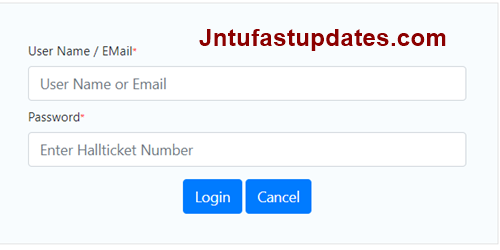
3. Login by using User name and password.

jntuk certificates verification portal login

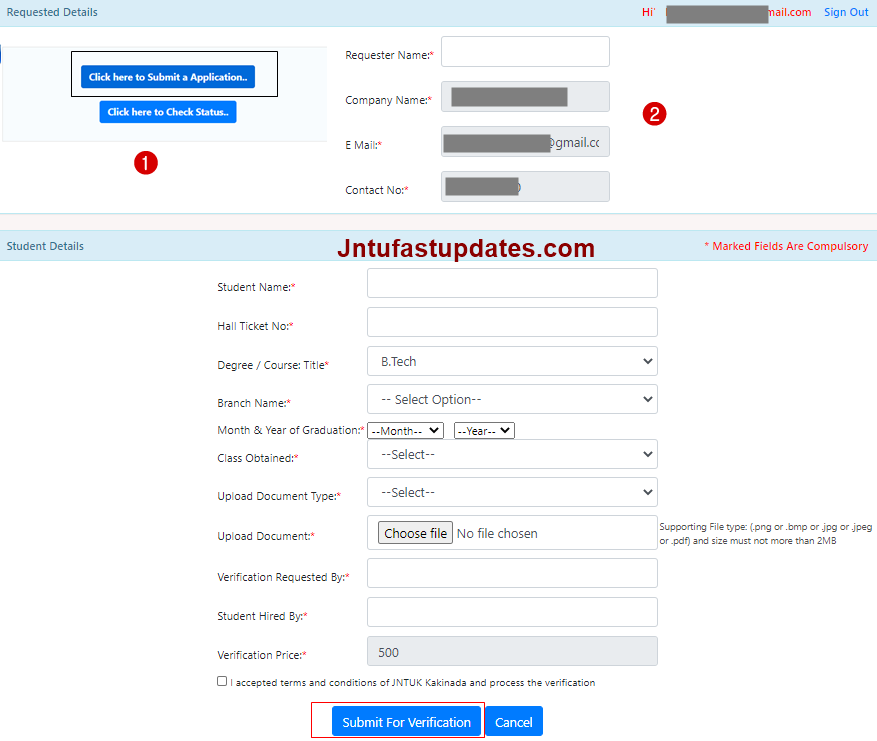
4. Click on “Click here to Submit a Application..” button and fill the required details

5. Pay Verification fee Rs 1000/2000 and Finally click on the Submit for verification.

6. You can also check your Application Status by click on ” Check Status ” button

Genuinity Verification Process: Apply By Post

This service is available to Government Organizations only. Note: There are no fees or charges for processing this application.

The original document of the request for verification is on the letterhead with the authoritys signature, along with the corresponding certificates PC / CMM / OD / Marks Memo(s). Submit all the above documents by post to the University Examination Center postal address mentioned below.

POSTAL ADDRESS
UNIVERSITY EXAMINATION CENTRE
JAWAHARLAL NEHRU TECHNOLOGICAL UNIVERSITY KAKINADA
KAKINADA, KAKINADA DISTRICT
PINCODE : 533 003

JNTUK Migration Certificate Name Correction Apply Online @ jntuksdc.co.in

JNTUK Migration Certificate Name Correction: JNTU Kakinada Procedure to apply online for Migration name Correction at jntuksdc.co.in.

JNTUK Migration Certificate Name Correction Apply Online @ jntuksdc.co.in

JNTUK Procedure to apply for Migration Correction through Online

Migration Certificate Name Correction

After payment the student only has to submit the printed payment receipt ,Original Migration Certificate, Identity proof,Application form BY POST to the university examination section for issue of new corrected Migration Certificate. The corrected Migration Certificate will be posted to the above address.

JNTUK Procedure for Apply online Migration Certificate Name Correction

1. Visit, JNTUK Official Website i.e., https://jntuksdc.co.in

2. Click on the link ‘Online Payments of TATKAL PC / Transcripts / Correction / Duplicate Certificates / Postal charges for WES / Medium of Instruction Certificate

3. Search for “REGISTRAR JNTU KAKINADA

4. Select ‘Payment Category‘ like

  • CMM Correction
  • DUPLICATE MARKS MEMOS
  • DUPLICATE OD
  • Discrepancy
  • Duplicate CMM
  • Duplicate Memo for 0.15 percent adjustment
  • Duplicate Migration Certificate
  • Duplicate Provisional Certificate
  • MARKS MEMO CORRECTIONS
  • Medium of Instruction Certificate
  • Migration Certificate Name Correction
  • Miscellaneous Amounts
  • Normal Provisional Certificate(Rs. 200/-)
  • ORIGINAL DEGREE CORRECTION
  • Postal Charges for WES
  • Provisional Certificate Correction
  • Transcripts
  • WES/CES/ICES/IQAS/NCEES/SPANTRAN VERIFICATION
  • TATKAL PC

5. Fill the required details in the application page

6. Make the payment

JNTUK Migration Certificate Apply Online, Application Form @ jntuksdc.co.in

JNTUK Migration Certificate Apply Online: JNTU Kakinada Migration certificate procedure, Application form, How to Apply for Migration Certificate Online? Jntuk Migration Certificate Status.

JNTUK Migration Certificate Apply Online, Application Form @ jntuksdc.co.in

jntuk

What is a migration certificate? The migration certificate is a document with no legal binding which states that the student has appeared for the IB exams in a specific session and that the IB has no objection in him/her joining any college or university in India or appear for examination of any board.

Also Check: JNTUK Migration Certificate Name Correction, Duplicate

JNTUK Step by Step Procedure For Apply Migration Certificate Online

The migration application process is entirely online. Follow the steps below to apply for it.

The Xerox copies of the following, with the attestation of the college principal:

Migration application here: Migration Application Form

  • Xerox copy of SSC certificate
  • Xerox copy of PC
  • Xerox copy of CMM (Required for UG)
  • Xerox copies of Mark memos for all the semesters (Required for PG)
  • Xerox copy of Aadhaar Card.
  • Recent passport size color photograph

JNTUK Migration Certificate Apply Online Procedure

Step-1:- Registration

Click here for Apply Online-OD

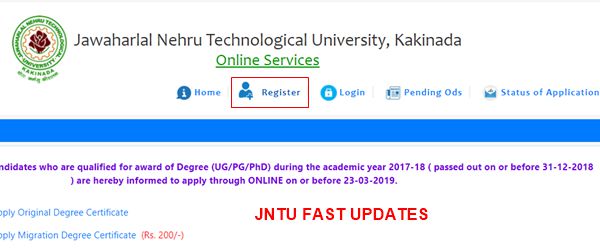
  • Click on the “Register” button at TOP menu.
registration

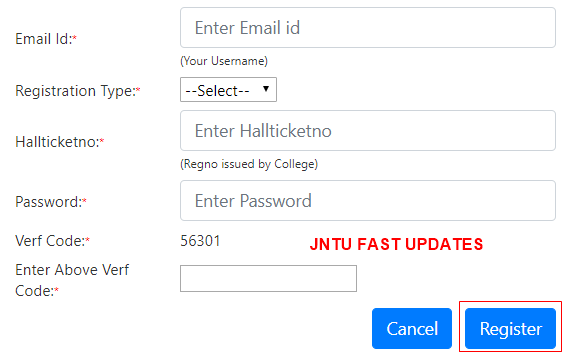
Step-2:- Please Enter Present Working Email-Id, Hallticket no, password.

register details

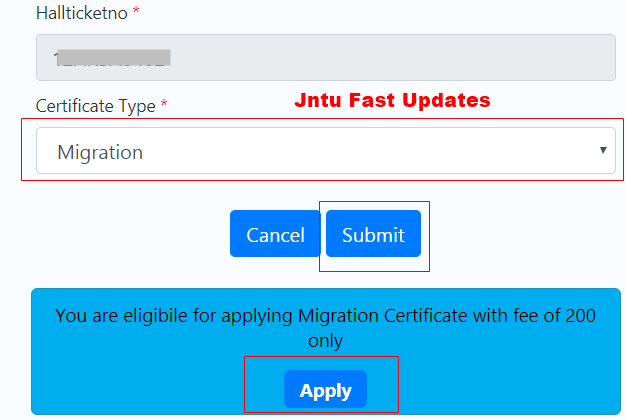
Step-3:- Check Eligibility & Fees of Application

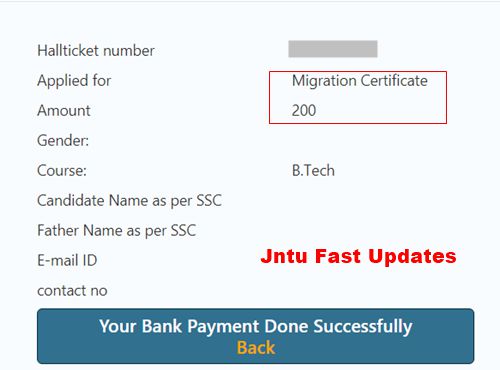
Note: If you are Eligible for Applying Migration Certificate it shows ” You are eligibile for applying Migration Certificate with fee of 200 only.

jntuk migration certificate apply

Step By Step Procedure to apply Migration Certificate please follow the guidelines

Terms and Conditions(step-I)

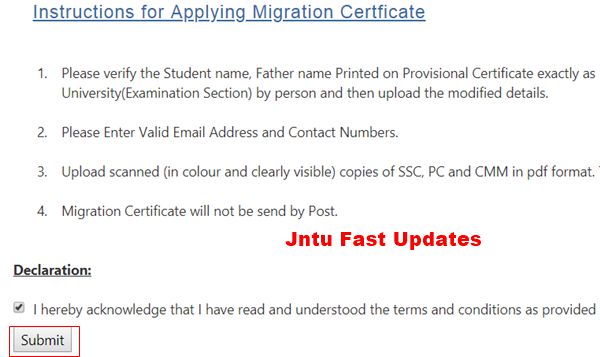
Instructions for Applying Migration Certificate

  1. Please verify the Student name, Father name Printed on Provisional Certificate exactly as per SSC. If any mistake found immediately correct your PC in University(Examination Section) by person and then upload the modified details.
  2. Please Enter Valid Email Address and Contact Numbers.
  3. Upload scanned (in colour and clearly visible) copies of SSC, PC and CMM in pdf format. The maximum size of each document is 200 kB.
  4. Migration Certificate will not be send by Post.

Instructions for Applying Migration Certificate

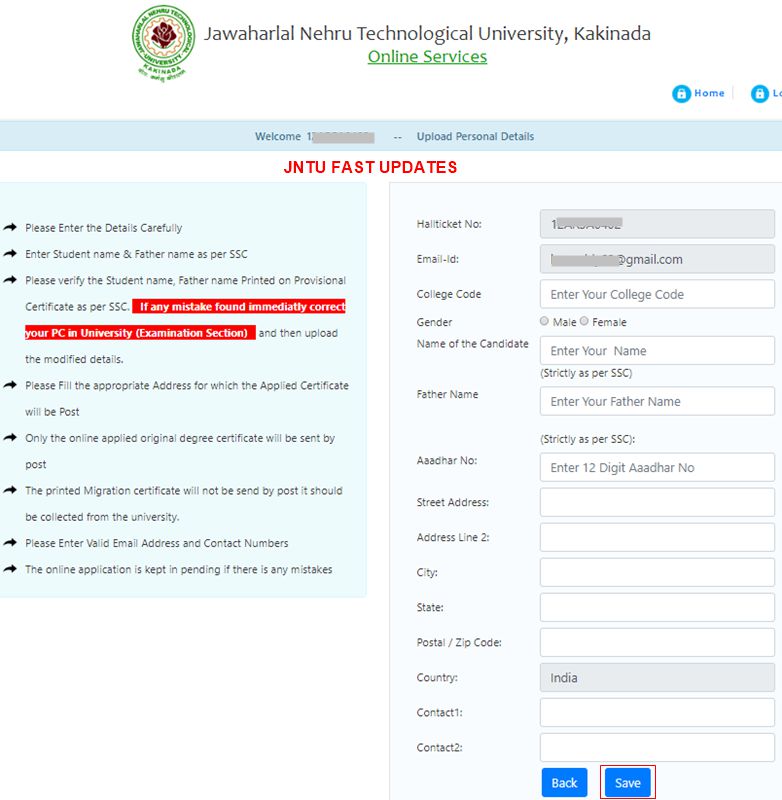
Upload Personal Details (Step-II)
  • Please Enter the Details Carefully
  • Enter Student name & Father name as per SSC
  • Please verify the Student name, Father name Printed on Provisional Certificate as per SSC. If any mistake found immediatly correct your PC in University (Examination Section) and then upload the modified details.
  • Please Fill the appropriate Address for which the Applied Certificate will be Post
  • Only the online applied original degree certificate will be sent by post
  • The printed Migration certificate will not be send by post it should be collected from the university.
  • Please Enter Valid Email Address and Contact Numbers
  • The online application is kept in pending if there is any mistakes

Upload Personal Details

Note:

  • Only Original Degree Certificate will be send by post
  • Except Original Degree Certificate will not be send by post it should be collected from the university by applied student only.
Bank Payment Fee (Step-III)
  • Please Enter the Details Carefully
  • The student / college/ customer has to confirm the fee amount to be paid is correct under right service/ head, i.e. Provisional Certificate, Original Degree Certificate,Migration, Examination fee, etc.
  • Application will be processed only upon receipt of required fee. Application with insufficient payment will not be processed/ entertained.
  • Application/Service fee + service charges + Taxes as applicable; will be debited from student / college/ customer account.
  • Wrong payment, i.e., payment for one head/service instead of the desired / intended head/ service will not be refunded. (Ex. Payment made for Provisional Certificate actually intended to pay for Original Degree certificate will not be refunded.)
  • Payment made for one service will not be considered / Adjusted for other services.
  • Request for refund of excess payment shall be made within 7 working days. Excess payment will be refunded only upon submission of proof for genuine cause. However, the decision of the University is final for refund of excess payment. In case of refund, service charges + taxes as applicable will be debited from the student/ college/ customer account.
  • For any technical queries, Contact No. 0884-2300911 may be contacted during working days.

jntuk migration certificate fee

Upload Documents (Step-IV)
  • Dont upload the passport size photgraph which is taken by the Mobile, Laptop etc.
  • Upload a recent colour passport size photograph as per the specifications given on the left. This photograph will be printed on the Original Degree certificate. The size of the photograph shall be between 50kB and 100 kB.
  • Upload scanned (in colour and clearly visible) copies of SSC, PC and CMM in pdf format. The maximum size of each document is 200 kB.
  • Upload scanned (in colour and clearly visible) copies of semester marks memos in pdf/Zip format. The maximum size of document is 500 kB.
View Data (Step-V)

Personal Details :

JNTUK Transcripts Apply Online, Download UG/PG Application form @ jntuksdc.co.in

JNTUK Transcripts Apply Online: Jntu kakinada apply Transcripts Online Procedure given below. Candiates can download UG/PG Transcripts Application forms at jntuksdc.co.in.

JNTUK Apply Transcripts Online (Transcripts Application Form)

JNTUK Procedure to apply for Transcripts through Online

The following Xerox copies, with the attestation of the college principal, are required for the transcripts.

JNTUK Transcripts Aplication form Download

JNTUK UG-Transcript Application

JNTUK PG_Transcript Application

Required Documents

  1. Xerox copies of the corresponding Marks Memos, PC, CMM, OD
  2. Xerox copy of the Aadhaar Card
  3. Xerox copy of online payment for the total number of Transcripts

JNTUK Transcripts Apply Online

1. Visit, JNTUK Official Website i.e., https://jntuksdc.co.in

2. Click on the link ‘Online Payments of TATKAL PC / Transcripts / Correction / Duplicate Certificates / Postal charges for WES / Medium of Instruction Certificate

3. Search for “REGISTRAR JNTU KAKINADA

4. Select ‘Payment Category‘ like

  • CMM Correction
  • DUPLICATE MARKS MEMOS
  • DUPLICATE OD
  • Discrepancy
  • Duplicate CMM
  • Duplicate Memo for 0.15 percent adjustment
  • Duplicate Migration Certificate
  • Duplicate Provisional Certificate
  • MARKS MEMO CORRECTIONS
  • Medium of Instruction Certificate
  • Migration Certificate Name Correction
  • Miscellaneous Amounts
  • Normal Provisional Certificate(Rs. 200/-)
  • ORIGINAL DEGREE CORRECTION
  • Postal Charges for WES
  • Provisional Certificate Correction
  • Transcripts
  • WES/CES/ICES/IQAS/NCEES/SPANTRAN VERIFICATION
  • TATKAL PC

5. Fill the required details in the application page

6. Make the payment

  • The payment amount is Rs. 45/- for each Transcript certificate.
  • Minimum postal charges for the certificate(s) is Rs. 50/-

JNTUK Apply For Medium of Instruction Certificate

JNTUK Apply For Medium of Instruction Certificate

jntuk

Required Documents

  • After the Payment of Fee, Submit the Payment Receipt, xerox copies of PC, Aadhar and Request letter to Registrar. (Visa & Passport if Student reside in Foreign Countries)
  • If Medium of Instruction Certificate is to be given to other than student,then mention the details of person(to whom MOI is to be given) in the authorization letter and attach the ID proof (Aadhar) of Student and Receiving Person.

JNTUK Medium of Instruction Certificate Procedure

1. Visit, JNTUK Official Website i.e., https://jntuksdc.co.in

2. Click on the link ‘Online Payments of TATKAL PC / Transcripts / Correction / Duplicate Certificates / Postal charges for WES / Medium of Instruction Certificate

3. Search for “REGISTRAR JNTU KAKINADA

4. Select ‘Payment Category‘ like

  • CMM Correction
  • DUPLICATE MARKS MEMOS
  • DUPLICATE OD
  • Discrepancy
  • Duplicate CMM
  • Duplicate Memo for 0.15 percent adjustment
  • Duplicate Migration Certificate
  • Duplicate Provisional Certificate
  • MARKS MEMO CORRECTIONS
  • Medium of Instruction Certificate
  • Migration Certificate Name Correction
  • Miscellaneous Amounts
  • Normal Provisional Certificate(Rs. 200/-)
  • ORIGINAL DEGREE CORRECTION
  • Postal Charges for WES
  • Provisional Certificate Correction
  • Transcripts
  • WES/CES/ICES/IQAS/NCEES/SPANTRAN VERIFICATION
  • TATKAL PC

5. Fill the required details in the application page

6. Make the payment

JNTUK Procedure For Correction In Transcripts

JNTUK Procedure For Correction In Transcripts

jntuk

To correct details in your academic transcripts, submit the following documents to the University Examination Center Counter, JNTUK:

Required Documents

  1. Request Letter: A formal request letter from the college principal.
  2. Original Transcripts: All sets of original transcripts that require correction.
  3. Original Marks Memos: Original copies of all Marks Memos.
  4. SSC Certificate Copy: A xerox copy of your SSC certificate as a supporting document.
  5. Online Payment Receipt: A copy of the online payment receipt for the correction.

Procedure For Correction In Transcripts

1. Visit, JNTUK Official Website i.e., https://jntuksdc.co.in

2. Click on the link ‘Online Payments of TATKAL PC / Transcripts / Correction / Duplicate Certificates / Postal charges for WES / Medium of Instruction Certificate

3. Search for “REGISTRAR JNTU KAKINADA

4. Select ‘Payment Category‘ like

  • CMM Correction
  • DUPLICATE MARKS MEMOS
  • DUPLICATE OD
  • Discrepancy
  • Duplicate CMM
  • Duplicate Memo for 0.15 percent adjustment
  • Duplicate Migration Certificate
  • Duplicate Provisional Certificate
  • MARKS MEMO CORRECTIONS
  • Medium of Instruction Certificate
  • Migration Certificate Name Correction
  • Miscellaneous Amounts
  • Normal Provisional Certificate(Rs. 200/-)
  • ORIGINAL DEGREE CORRECTION
  • Postal Charges for WES
  • Provisional Certificate Correction
  • Transcripts
  • WES/CES/ICES/IQAS/NCEES/SPANTRAN VERIFICATION
  • TATKAL PC

5. Fill the required details in the application page

6. Make the payment

  • The fee for correction in a set of transcripts is typically Rs. 50/- per set.
  • Additional postal charges may apply.

JNTUK Procedure For Correction In Marks Memo (Memorandum of Marks)

JNTUK Procedure For Correction In Marks Memo (Memorandum of Marks)

jntuk

Follow these steps to apply for a name or other correction in a Marks Memo:

Required Documents

  1. Request Letter: Write a formal request letter to the Controller of Examinations via your college principal.
  2. Original Marks Memo: Submit the original Marks Memo that requires correction.
  3. SSC Certificate Copy: Attach a photocopy of your SSC certificate as proof of correct name and details.
  4. Online Payment Xerox: Provide a xerox copy of the online payment receipt for the correction.

Procedure For Correction In Marks Memo

1. Visit, JNTUK Official Website i.e., https://jntuksdc.co.in

2. Click on the link ‘Online Payments of TATKAL PC / Transcripts / Correction / Duplicate Certificates / Postal charges for WES / Medium of Instruction Certificate

3. Search for “REGISTRAR JNTU KAKINADA

4. Select ‘Payment Category‘ like

  • CMM Correction
  • DUPLICATE MARKS MEMOS
  • DUPLICATE OD
  • Discrepancy
  • Duplicate CMM
  • Duplicate Memo for 0.15 percent adjustment
  • Duplicate Migration Certificate
  • Duplicate Provisional Certificate
  • MARKS MEMO CORRECTIONS
  • Medium of Instruction Certificate
  • Migration Certificate Name Correction
  • Miscellaneous Amounts
  • Normal Provisional Certificate(Rs. 200/-)
  • ORIGINAL DEGREE CORRECTION
  • Postal Charges for WES
  • Provisional Certificate Correction
  • Transcripts
  • WES/CES/ICES/IQAS/NCEES/SPANTRAN VERIFICATION
  • TATKAL PC

5. Fill the required details in the application page

6. Make the payment

  • The payment amount is Rs. 50/- for the correction of one Marks Memo.
  • Postal charges for the certificate(s) Rs. 50/-

JNTUGV B.Tech 3-1, 3-2 Sem Special Supply Time Tables Sept 2025 (Affiliated & Autonomous)

JNTUGV B.Tech 3-1, 3-2 Sem Special Supply Time Tables Sept 2025 Released for Affiliated & Autonomous colleges.

JNTUGV B.Tech 3-1, 3-2 Sem Special Supply Time Tables Sept 2025 (Affiliated & Autonomous)

JNTUGV

Jawaharlal Nehru Technological University, Gurajada, Vizianagaram (JNTUGV) has announced the B.Tech III-I, III-II Semester Special Supplementary Examination Time Tables September 2025 on it’s official site. The Candidates who are looking for the 3-1, 3-2 Sem Special supply time tables, All those candidates are requested to download the Time Tables 2025 from below. After that, the students are advised to start preparing for the semester examinations.

Exams Starts from: 04-09-2025 (FN)

Exams Conclude on:10-09-2025 (AN)

Examination Time: 10.00 AM TO 1.00 PM/02.00 PM TO 05.00 PM

JNTUGV 3-1, 3-2 Sem Special Supply Time Tables 2025

The following Examination time tables are released:

  • III B.TECH I SEMESTER (R16, R13) – SPECIAL SUPPLEMENTARY EXAMINATIONS, SEPT – 2025 (Affiliated & AUTONOMOUS Colleges)
  • III B.TECH II SEMESTER (R16, R13) – SPECIAL SUPPLEMENTARY EXAMINATIONS, SEPT –2025 (Affiliated & AUTONOMOUS Colleges)

Download the time tables from links given below:

III B. TECH – I SEMESTER (R13) SPECIAL SUPPLY EXAM TIME TABLE SEP 2025

III B. TECH – I SEMESTER (R16) SPECIAL SUPPLY EXAM TIME TABLE SEP 2025

III B. TECH – II SEMESTER (R13) SPECIAL SUPPLY EXAM TIME TABLE SEP 2025

III B. TECH – II SEMESTER (R16) SPECIAL SUPPLY EXAM TIME TABLE SEP 2025

III B.TECH I & II SEM SPECIAL SUPPLY END AUTONOMOUS EXAM TIME TABLE SEPT 2025

JNTUA M.Tech/M.Pharmacy 1st, 2nd, 3rd Sem (R21) Regular/Supply Results July 2025 – Released

JNTUA M.Tech/M.Pharmacy 1st, 2nd, 3rd Sem (R21) Regular/Supply Results July 2025, JNTU Anantapur M.tech, M.Pharmacy I, II, III Semester results 2025 are available at jntuaresults.ac.in

JNTUA M.Tech/M.Pharmacy 1st, 2nd, 3rd Sem (R21) Regular/Supply Results July 2025

JNTUA M.Tech/M.Pharmacy 1st, 2nd, 3rd Sem (R21) Regular/Supply Results July 2025

JNTU Anantapur had released M.Tech/M.Pharmacy 1st, 2nd, 3rd Sem R21 Regular/Supply Examination Results July 2025. Students can check their Examination Results from links given below.

The Following Examination Results Released by JNTUA:

  • M.Tech I, II, III Semester (R21) Regular & Supplementary Examinations, July 2025
  • M.Pharmacy I, II, III Semester (R21) Regular & Supplementary Examinations, July 2025

Get Your Results From links given below:

M.Tech Results:

M.Tech I Semester (R21) Supplementary Examinations, July 2025

M.Tech II Semester (R21) Regular & Supplementary Examinations, July 2025

M.Tech III Semester (R21) Supplementary Examinations, July 2025

M.Pharmacy Results:

M.Pharmacy I Semester (R21) Supplementary Examinations, July 2025

M.Pharmacy II Semester (R21) Regular & Supplementary Examinations, July 2025

M.Pharmacy III Semester (R21) Supplementary Examinations, July 2025